What is the best software to improve trial-to-paid conversion in 2026?


A trial is usually won or lost in its first few days. People sign up, look around, don't reach a first win, and don't come back. The software that fixes this does four jobs: it shows each new user the path to that first win, reacts when someone stalls, reaches people who have left the app, and shows you where they drop off.
The user onboarding tools below all do some of this, but not the same parts, and not on the same plan. Pick one that covers only the first job and your trial users still go quiet. Pick one where the job you need sits on a plan several times the entry price, and the business case falls apart. This guide compares six tools on all four jobs, so you can see which fits your trial and your budget.
The short answer
Why trials drop off in the first week
Trial users rarely leave because the product is wrong for them. They leave because they never saw why it's right. There's no clear first step, so they click around and log out. They're shown everything at once and can't tell what matters. Nothing brings them back on day two. Or the upgrade ask arrives before they've had a single win, so it feels like a sales pitch.
Each of those has a fix a user onboarding tool can run without a developer: a short path to one first win, a nudge when someone stalls, a message that reaches them after they leave, and an upgrade prompt timed to the moment they get value.
For tactics beyond the tools, such as unlocking every feature, asking for a card upfront and timing reminders, see our strategies to convert trial users.
How we compared
We looked at six tools that product teams often shortlist for in-app user onboarding and checked each against the four jobs: guiding users to a first win, reacting when they stall, reaching them outside the app, and showing where they drop off. For each one we also noted which plan you need for those jobs and what it costs. Every fact comes from the vendor's own pricing page and help docs. Ratings come from G2.
The six tools side by side
Prices and plans as shown on each vendor's pricing page. Userpilot's page doesn't state a billing period. Ratings from each tool's G2 page.


A closer look at each tool
1. Product Fruits: best for teams who want trial users guided, nudged and answered at a price they can see
Product Fruits is a no-code user onboarding platform. On every plan, an onboarding checklist gives each trial user a short path to a first win, and Tours and Hints show them how to get there. Analytics show where people drop off, step by step, and can be filtered by segment.
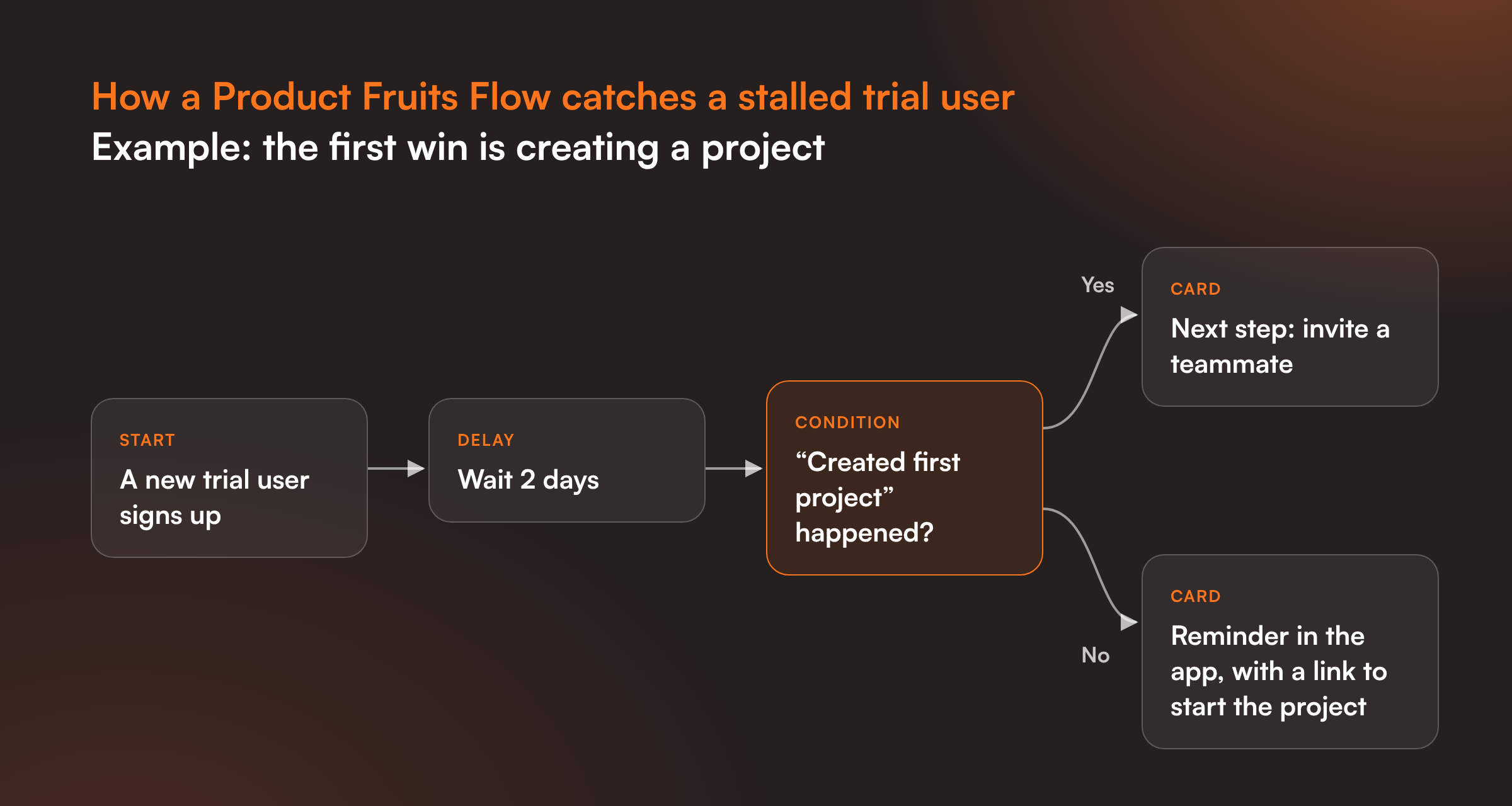
From Pro, Product Fruits Flows can react to what a user did or didn't do. A Condition step checks whether a custom event happened in the last few hours or days, and a Delay step waits before the next nudge. So a user who signed up yesterday and never created their first project can get a reminder the next time they log in, while a user who did gets the next step. Elvin Copilot answers trial users' questions inside your app, from your own help docs, and a Flow can open Elvin at the moment someone looks stuck. When a user reaches their first win, a Flow can show a banner or pop-up with the upgrade offer.
Where it stops: email to users who've left the app is on Business only, and it goes out through your own email provider (SMTP, SendGrid, Amazon SES or Mailgun). Starter covers checklists and analytics but not the stall-and-nudge logic, which starts on Pro. We also don't sell product analytics, so for funnels across your whole product you'll keep the analytics tool you already use.
Starter begins at $111 a month at 1,500 MAU billed annually, or $149 billed monthly. Pro, where Flow conditions start, is $187 a month at 1,500 MAU billed annually. Every self-serve plan comes with a free 14-day trial, no credit card needed.
2. Userpilot: best for teams who want onboarding, email and product analytics in one tool
Userpilot covers all four jobs in one product, from its Growth plan. Growth adds behavior-triggered email, with up to 100,000 emails a month included and no separate email provider needed. It also adds custom events and product analytics with funnels, paths and retention. Starter is $299 a month with 2,000 MAU and includes usage trends, but not funnels or email. Growth starts at $849 a month.
3. Appcues: best for teams who want in-app and email messages from the same rules
Appcues runs re-engagement through Workflows. A Workflow can start when an event happened but a follow-up didn't, wait a set time, then send an email or an in-app message. That makes "started setup, never finished" journeys a strength. Appcues sells two plans: Grow, from $9,000 a year with the price scaling by monthly active users up to 50,000, and Enterprise. Behavior-based email is an add-on on Grow. There's no self-serve trial: you book a call.
4. Userflow: best for teams who want flexible start conditions on a modest budget
Userflow can start a flow or checklist on an event, a user attribute, a page or an element, and it can target users who did something "exactly 0 times in the last" few days, with a wait condition in front. Every plan includes unlimited flows and checklists. It doesn't send email to your users; its email alerts go to your own team. Startup is $240 a month billed annually ($300 monthly) with 3,000 MAU, the most on any entry plan here. Pro is $680 a month with 10,000 MAU.
5. UserGuiding: best for smaller teams who want a simple setup on a lower budget
UserGuiding can use custom events your app sends on every plan, so a guide can react to what a user did. Starter has one active checklist and analytics reports; Growth adds no-code event tracking, A/B tests, goal tracking and five checklists. It doesn't send email to users who've left the app. Starter is $249 a month billed annually with 2,000 MAU; Growth is $499.
6. Pendo: best for larger teams who want product analytics first
Pendo is built around product analytics. Funnels and paths show exactly where trial users drop off, and data is captured from the day you install it, so you can look back at behavior you didn't plan to track. Its Resource Center has an onboarding checklist that shows each user's progress. Email to users outside the app comes through Orchestrate, a paid add-on on Base and Core and included on Ultimate. Pendo publishes no prices; every paid plan is "Request pricing". For more on what Pendo costs, see our Pendo pricing guide.
What to look for
One clear first win
A trial needs a finish line the user can see. Pick the one action that shows your product's value, such as a first project, a first report or a first invite, and check that the tool can build a short checklist toward it and tell you who completed it.
If an admin and an end user want different things from your product, each may need their own first win. Our guide to role-based user onboarding tools covers how each tool handles that.
Nudges based on what users didn't do
Showing a tour on first login is easy. The harder part, and the one that rescues trials, is reacting when someone signed up two days ago and still hasn't done the key step. Look for conditions on an event that didn't happen within a time window, plus a delay before the nudge, and check which plan they're on.
Reaching users who left
In-app messages only reach people who come back. For everyone else you need email. Some tools send it themselves, some send through your own email provider, and some don't send it at all. Teams in the last group often pair their user onboarding tool with an email tool such as Customer.io.
Seeing where trials drop off
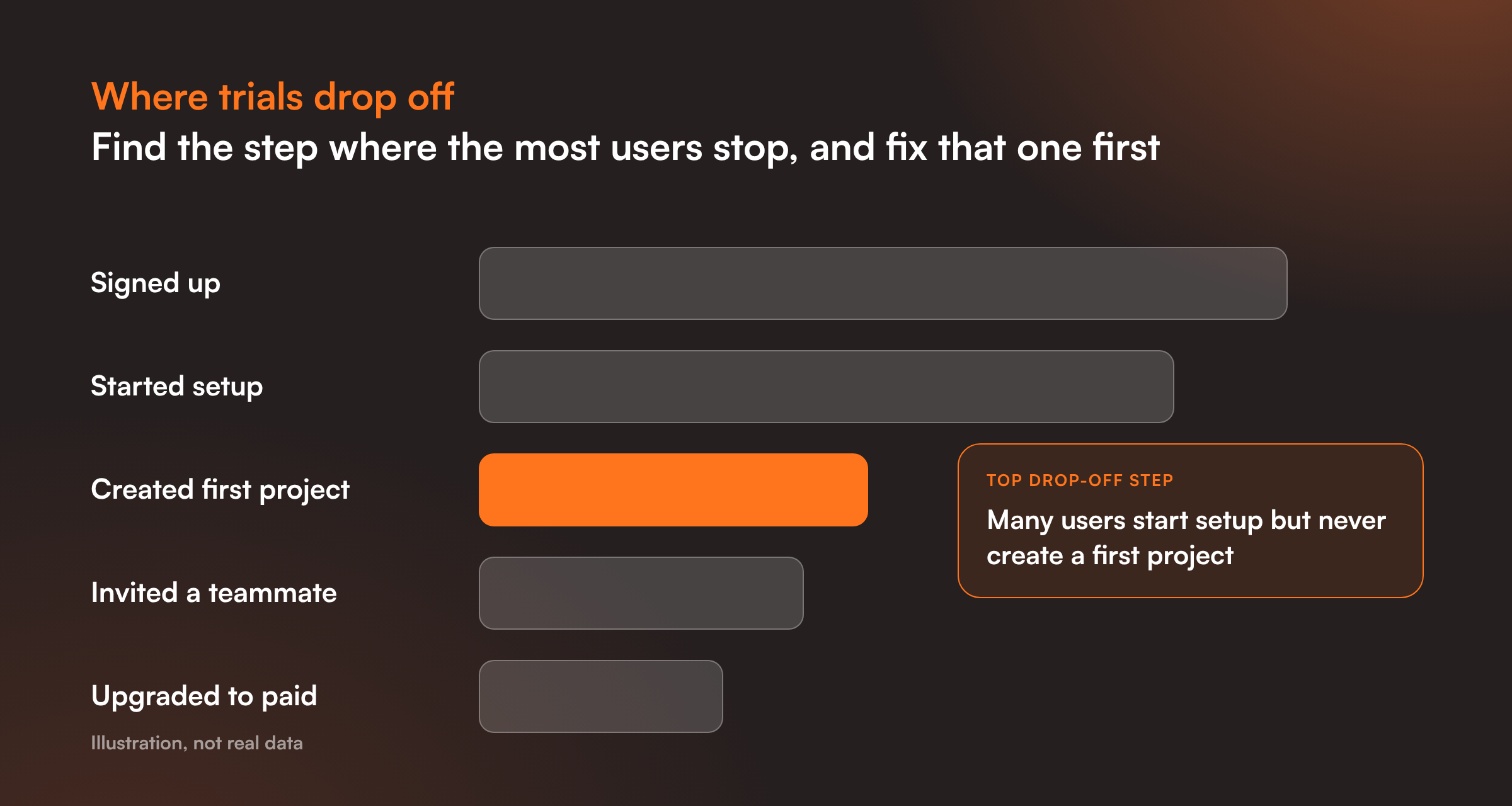
A trial-to-paid rate tells you there's a problem, not where it is. Look for analytics that show the step where users leave a flow or a checklist, and that you can split by segment, so you can fix one step at a time.
Asking for the upgrade at the right moment
An upgrade prompt on day one reads as a sales pitch. One shown right after the first win reads as the obvious next step. Check that the tool can trigger a banner or pop-up from a completed step or event, not just from a date.
What it costs at your trial volume
Trial users who log in usually count as monthly active users, so a busy free trial can push you into a higher tier. Price the plan that has the features above at the number of trial users you expect, not the entry plan.
How to pick
The quickest way to choose is to rebuild your own first week in each tool's trial. Pick the one action that marks a first win, then check these five things:
- Can you build a short checklist to that first win in under an hour? If it takes a developer, it will take longer in real life too.
- Can you nudge someone who hasn't done it after two days? Set up the condition and the delay, and note which plan it needs.
- How will you reach users who don't come back? Find out whether the tool sends email itself, through your own provider, or not at all.
- Can you see the step where people stop? Run a few test users through and open the analytics for that step.
- What does the plan with all of this cost at your trial volume? Not the entry price, the plan that covers everything above.
If you'd like to try this with Product Fruits, the free trial gives you 14 days, with no credit card needed.
Frequently asked questions
Why do trial users drop off in the first week?
Usually because they never reach a first win. There's no clear first step, too much is shown at once, nothing brings them back after the first visit, or the upgrade ask comes before they've seen any value.
What's the difference between activation and trial-to-paid conversion?
Activation is the moment a new user first gets value, such as creating their first project. Trial-to-paid conversion is the share of trial users who become paying customers. Activation comes first: users who never activate rarely pay.
What should you measure during a trial?
Four things: how many trial users complete the first-win checklist, the step where most of them stop, how many come back in the first week, and how many upgrade after their first win compared with those who don't reach it.
Can a user onboarding tool send emails to trial users?
Some can. Userpilot sends behavior-triggered email from its Growth plan, Appcues sends it through Workflows (an add-on on Grow), Pendo through its Orchestrate add-on, and Product Fruits on Business through your own email provider. Others only message users inside the app.
Do trial users count toward MAU pricing?
Usually yes, once they log in during the month. A popular free trial can move you into a higher tier, so price the plan you need at your expected number of trial users.
When should you show an upgrade prompt?
Right after a user reaches their first win, or when they hit a limit of the free plan. A prompt tied to a completed step feels like the natural next move; one shown on day one feels like a sales pitch.
Which Product Fruits plan do I need for this?
Starter covers onboarding checklists and analytics. Nudges based on what a user did or didn't do, using conditions in Product Fruits Flows, start on Pro. Email to users outside the app is on Business.
How much does Product Fruits cost?
Starter begins at $111 a month at 1,500 MAU billed annually, or $149 billed monthly. There's a free 14-day trial with no credit card needed. See every plan on our pricing page.


Weekly newsletter
Get the latest releases, tips, articles, and exclusive interviews delivered to your inbox weekly—no spam!