The best Kompassify alternatives for 2026 (when you outgrow Kompassify)


TL;DR
- Kompassify is a low-cost onboarding tool from $129/mo. Teams switch when they outgrow it: no knowledge base, an editor reviewers call buggy, and product analytics only on the top plan.
- Best all-in-one: Product Fruits with tours, checklists, announcements, knowledge base and help center from $111/mo (annual billing).
- Cheapest EU-hosted tool: Produktly from €19/mo.
- Most analytics: Userpilot.
- Free and open source: Usertour.
- Stay with Kompassify if you have fewer than 100 monthly active users.
Kompassify isn't expensive. At 1,500 monthly active users (MAU), its Pro plan costs $129 a month, $20 less than Product Fruits Starter. So if you're looking for an alternative, the bill usually isn't the reason.
The reason is that teams outgrow it. There's no knowledge base or help center, the reviews that complain mostly complain about the editor, and product analytics sit on the Business plan.
Below are eight alternatives grouped by what you need, and where Kompassify is still the better buy.
What does Kompassify cost?
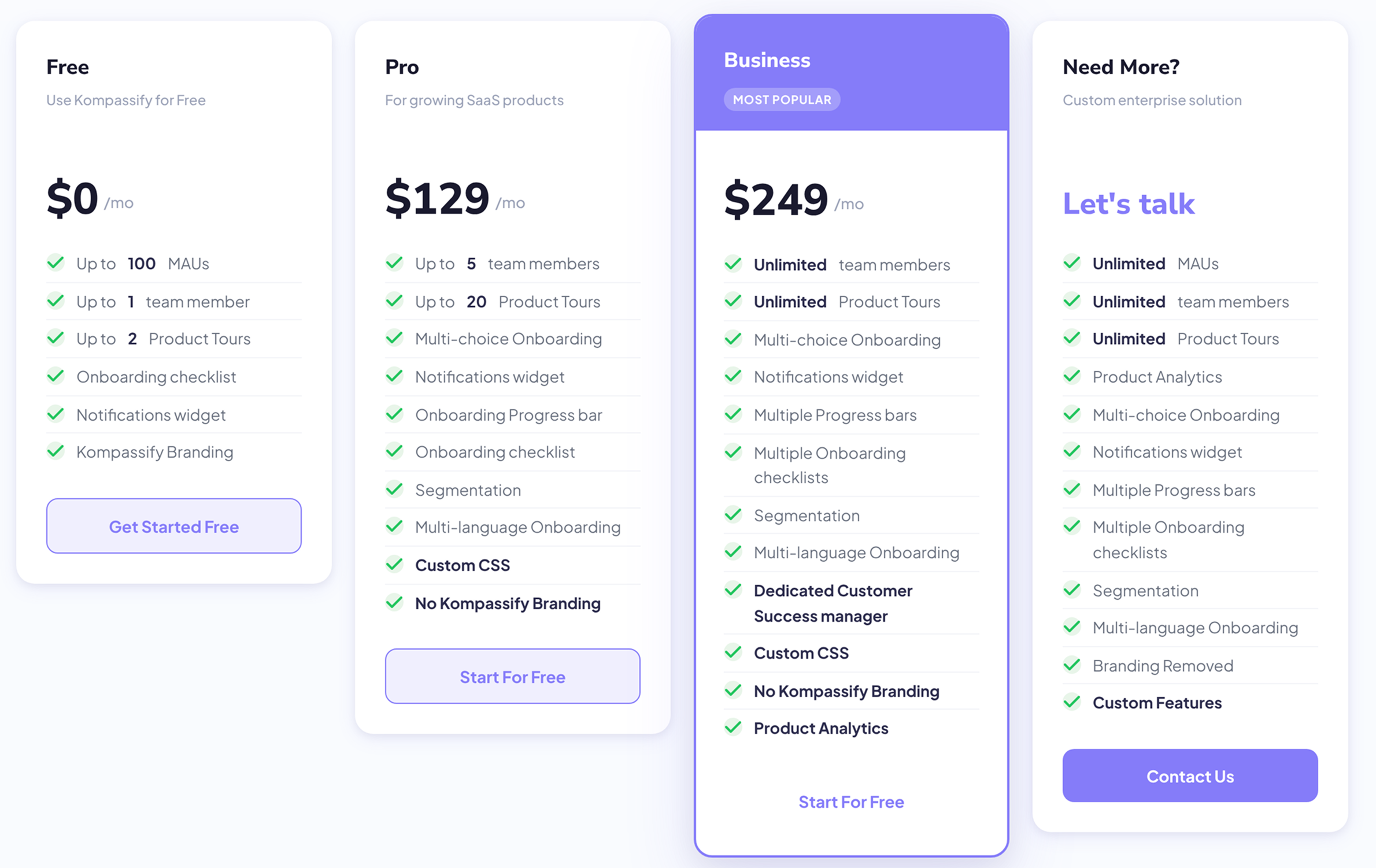
As of October 2026, Kompassify's pricing page has a free plan, two paid plans priced by MAU, and a custom Enterprise plan. Billing annually saves 25%.
Prices step up with usage. Pro is $199/month from 2,000 MAU and $249 from 5,000, and billed annually, Pro under 2,000 MAU works out to about $94 a month.
Why teams switch from Kompassify
Most teams that leave Kompassify have outgrown it. Onboarding starts with a few tours, then grows into in-app help, targeting and connected data. Kompassify's docs and site list no knowledge base or help center, and no integrations, REST API or SSO.
Kompassify holds 4.6 on G2, though from only 7 reviews, plus 15 on Capterra. Across those 22 reviews, the complaints that come up most are bugs and editor problems:
"There are occasional bugs, but the platform is always willing to fix them."
Content analyst, Mid-Market · G2
Kompassify doesn't publish a changelog, and its builder Chrome extension was last updated in November 2024, so it's hard to tell from the outside what has changed recently.
Analytics is the second limit. Product analytics (funnels, drop-off detection, feature usage reports) are on Business only, which is $249/month under 2,000 MAU, almost double the Pro price.
If you picked Kompassify because it keeps your data in the EU, you don't have to give that up. Its GDPR page says data is hosted with OVH in France and Contabo in Germany, and Product Fruits, Produktly or Jimo are EU-hosted too.
Kompassify alternatives at a glance
The 8 best Kompassify alternatives, grouped by what you need
1. Product Fruits: all onboarding and in-app communication in one tool
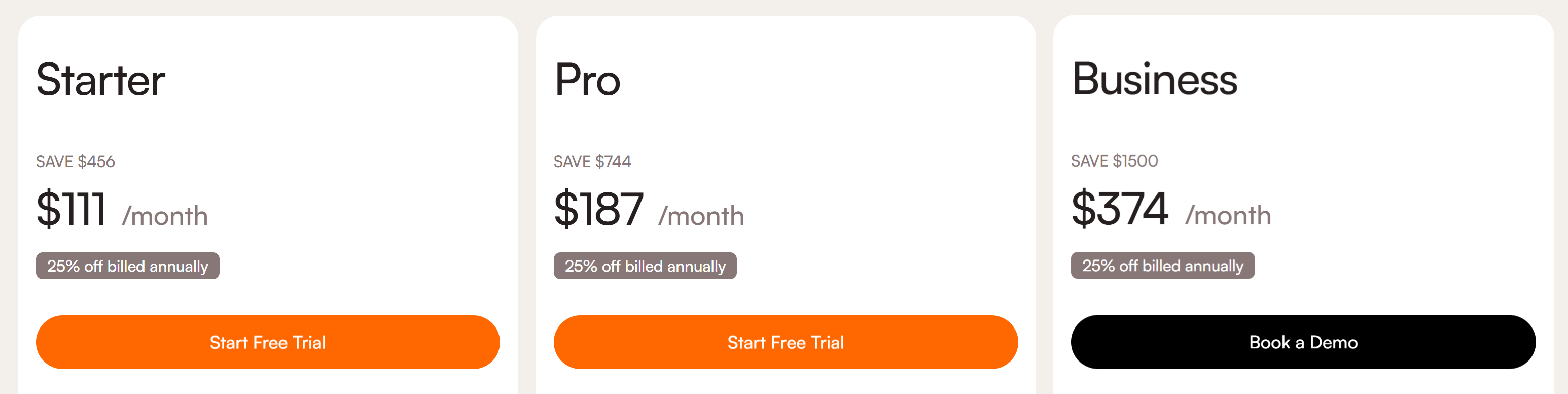
Price: $111/month billed annually at 1,500 MAU ($149 monthly)
G2: 4.7
Free trial: 14 days, no credit card
Product Fruits covers tours, checklists, hints and announcements like Kompassify does, and adds the parts Kompassify doesn't build.
Starter includes a public knowledge base, an in-app help center, the newsfeed, a feedback widget and Elvin AI, which answers your users' questions from the help content you add.
Pro ($187/month billed annually) adds adaptive, branching flows, custom events, surveys and NPS, 100 tours and unlimited checklists.
Adaptive flows are where it differs most. Instead of one tour for everyone, a flow can check whether a user already did the key action and skip them ahead, or branch to a different card if they didn't. Content keeps showing to users above your MAU quota while support reaches out to discuss the right plan.
Product Fruits is hosted in the EU and holds SOC 2 and ISO 27001.
The catch: surveys, branching flows and custom events start on Pro, and product analytics aren't its strength. If funnels and feature usage reports are what you'd pay Kompassify Business for, Userpilot fits better.
2. HelpHero: cheapest MAU-based tours tool
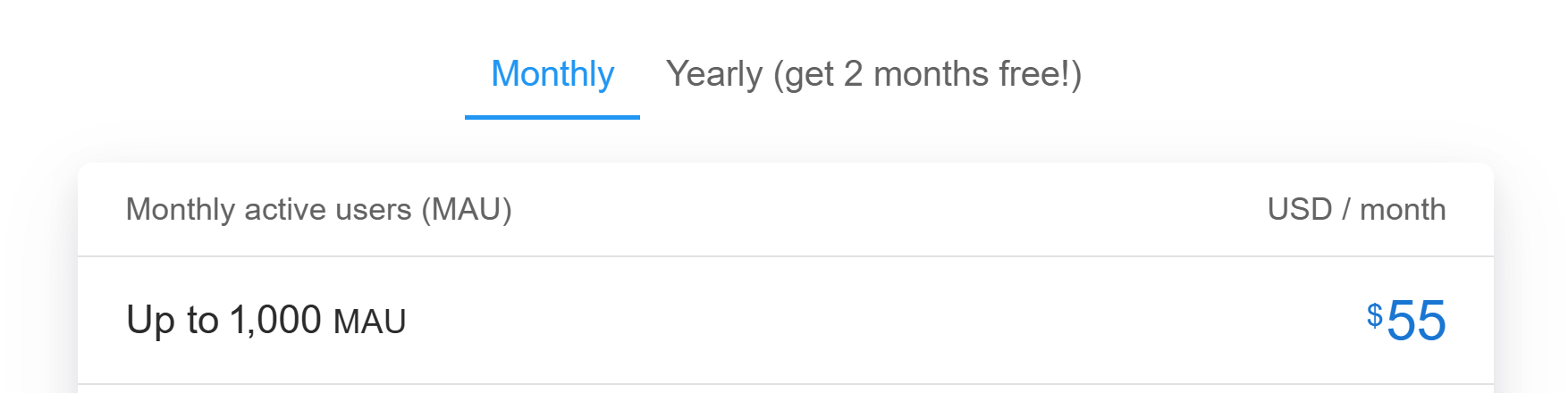
Price: $55/month at 1,000 MAU
G2: 4.9 (from only 18 reviews)
Free trial: 14 days, no credit card
A super-simple tool for the essentials: tours, checklists and hotspots, with unlimited tours and seats on every plan.
The catch: there's no knowledge base, announcements or feedback widget, so you'd lose Kompassify's notification widget and banners.
HelpHero also stores its data in US regions of Google Cloud, which may be a concern if EU hosting is why you chose Kompassify. We cover what HelpHero leaves out in our HelpHero alternatives guide.
3. Produktly: cheapest EU-hosted tool
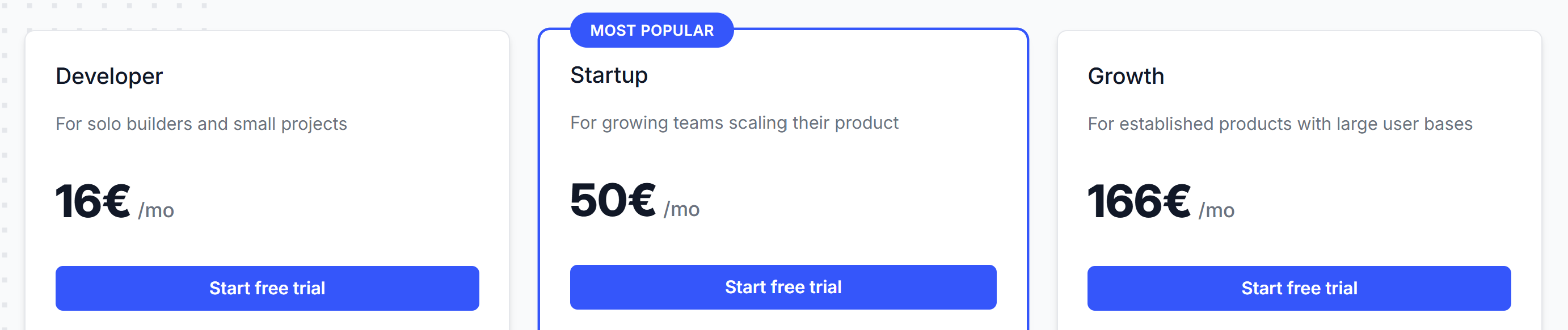
Price: €19/month (€16 billed annually) for 2,000 triggers a month
G2: 4.5
Free trial: 14 days
Produktly bundles tours, checklists, smart tips, NPS, a changelog and a public roadmap. Its entry plan costs a fraction of Kompassify Pro.
The catch: it bills by triggers, not users. Each tour start, checklist step or smart tip counts, and if you go well over the quota and don't upgrade, your content stops showing until the month resets. There's no knowledge base or help center either.
4. UserGuiding: simple onboarding for startups
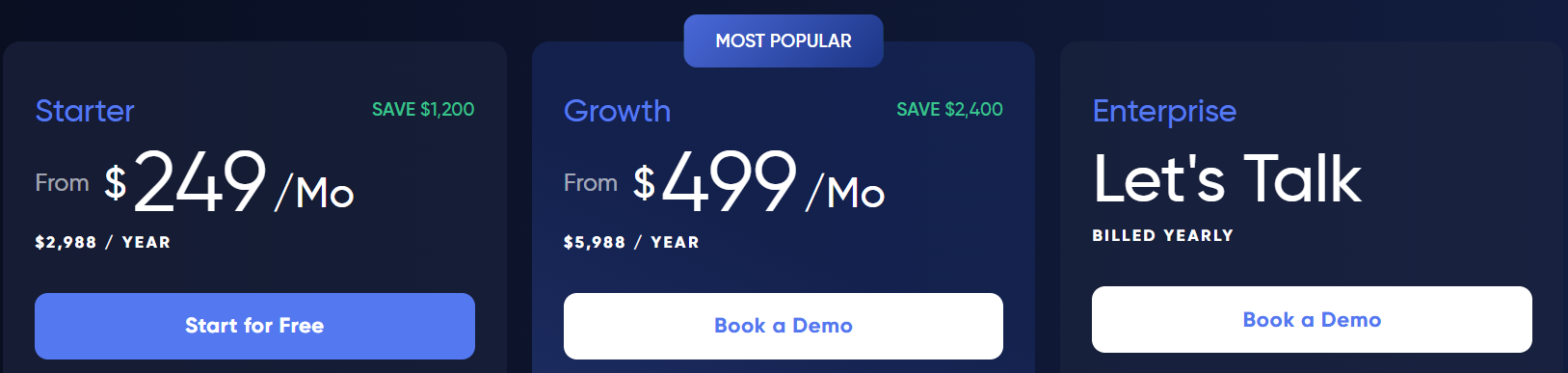
Price: $249/month billed annually ($349 monthly) for up to 2,000 MAU
G2: 4.7
Free trial: 14 days, no credit card
A simple, no-code onboarding tool with tours, checklists, a knowledge base, product updates and NPS on its entry plan. It's a close match to Kompassify's mix of features, with a knowledge base added, at a higher price.
The catch: Starter allows 1 active checklist, survey and banner. EU hosting is a paid add-on on Starter and included from Growth ($499/month billed annually). There's a side-by-side on our UserGuiding alternative page.
5. Userpilot: onboarding plus product analytics
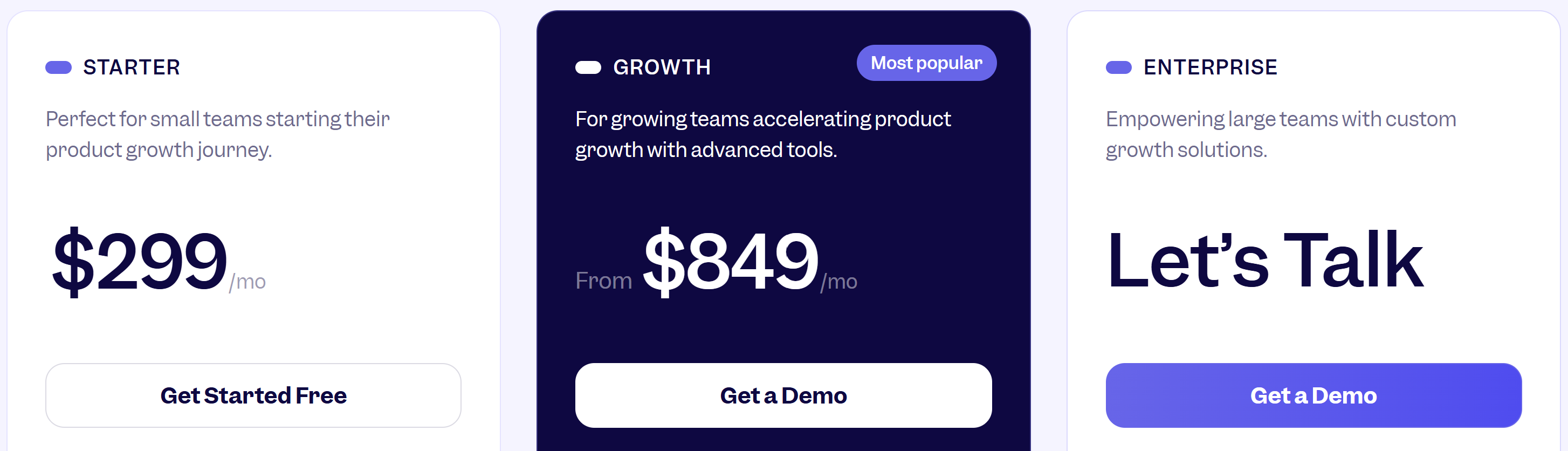
Price: $299/month up to 2,000 MAU
G2: 4.6
Free trial: 14 days, no credit card
Userpilot pairs in-app guidance with product analytics, which suits teams that want to measure feature adoption in the same tool that drives it. If analytics is why you'd move to Kompassify Business, this is the stronger version of that. Starter includes NPS.
The catch: surveys beyond NPS and the resource center start on Growth, from $849 a month, and so does EU hosting.
6. Userflow: developer-friendly
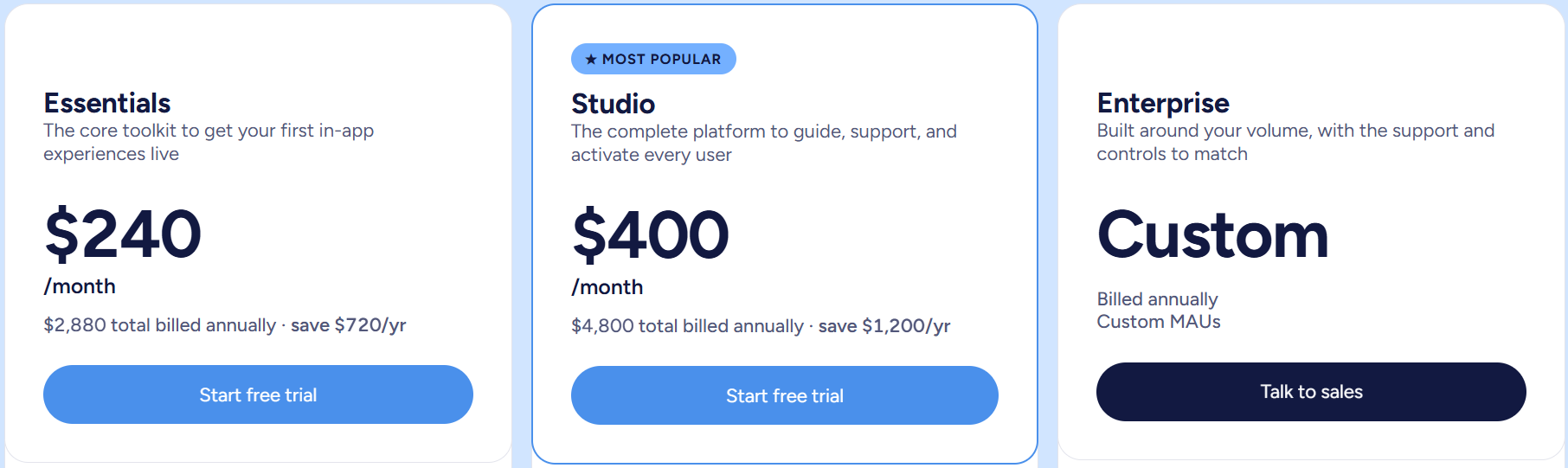
Price: $240/month billed annually ($300 monthly) for 1,000 MAU
G2: 4.8
Free trial: 14 days, no credit card
A flow builder with checklists, surveys and NPS, announcements and a resource center on its entry Essentials plan, built for teams that want fine control over logic. It's EU-hosted. For help content, it searches a third-party knowledge base rather than hosting one.
The catch: Essentials covers only 1,000 MAU, and a white-labeled resource center, AI credits and all integrations need Studio at $400/month billed annually.
7. Jimo: changelog and feedback in one bundle
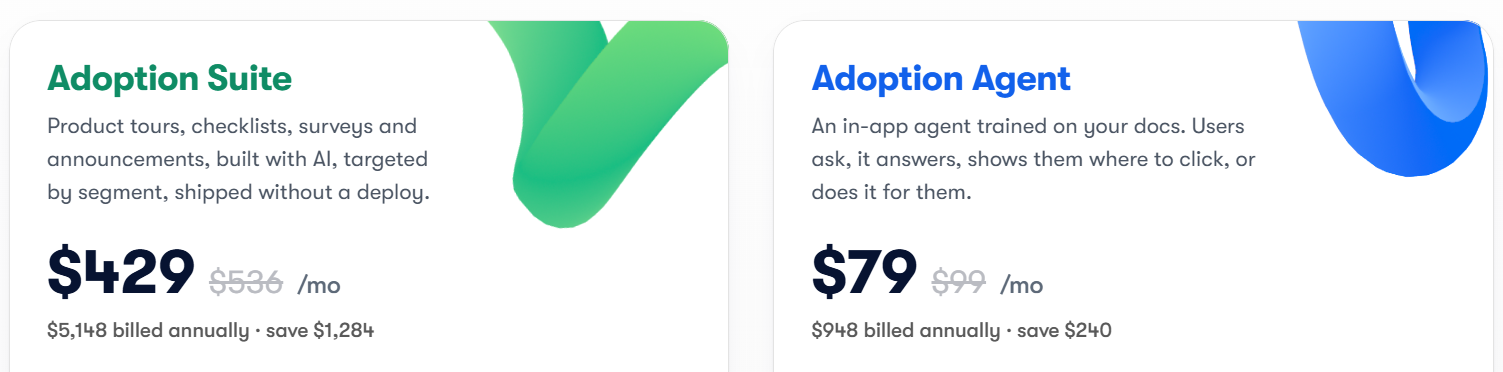
Price: $429/month billed annually ($536 monthly) for 2,000 MAU
G2: 4.6
Free trial: 1 month
Jimo combines tours, checklists, a changelog, surveys and a resource center, and it's EU-hosted. It suits teams that want product updates and feedback in the same place as onboarding.
The catch: there's no built-in knowledge base, so help articles still need a separate tool.
Free and open-source Kompassify alternatives
If you're on Kompassify's free plan and want to stay at zero, two routes cost nothing to start.
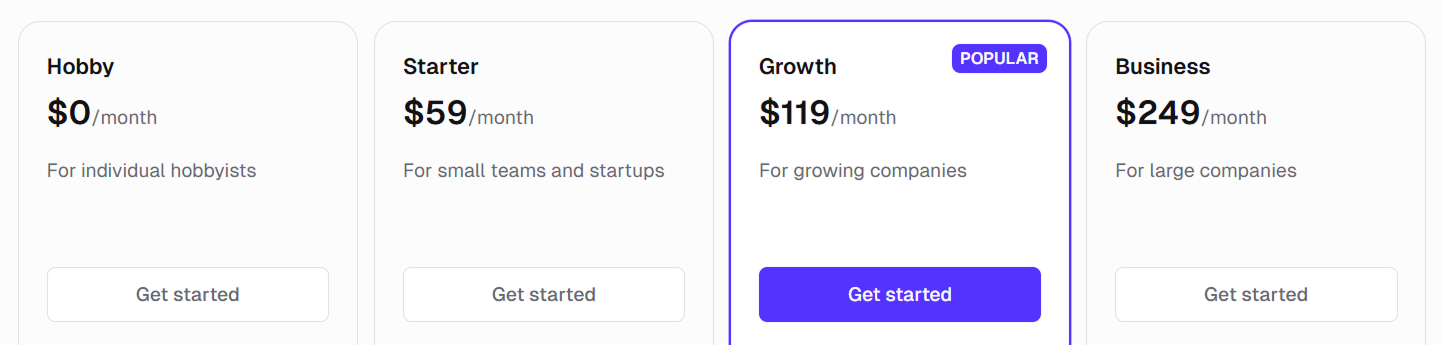
Usertour is open source under the MIT license and free to self-host, with a cloud version from $49/month billed annually. Your team runs the servers and the updates.
Libraries like Shepherd.js, Intro.js and Driver.js are free too, but your developers build, style and maintain every tour, and there's no editor for the rest of the team.
How do you migrate from Kompassify?
Copy first, rebuild second. Kompassify's docs describe no export for tours or checklists, and its terms say account content "cannot be recovered" once the account is cancelled.
- Save what you want to keep. Copy the text of your tours, checklists and NPS questions, and take screenshots before you cancel.
- Rebuild the content that drives activation first. Start with the one or two tours or checklists new users need, not the whole library.
- Swap the snippet. Replace Kompassify's player script and its
window.KompassifyJS.identifyUsercall with the new tool's snippet and identify call, passing the same user ID and attributes. - Recreate your segments. Segments set in code with
addUserToSegmentor by URL keyword become user attributes or segment rules in the new tool. - Remove Kompassify once the new content is live, so users don't see two tours at once.
When is Kompassify still the better buy?
Stay with Kompassify if you have fewer than 100 monthly active users. The free plan covers basic tours, a checklist and the notification widget at no cost.
Stay if price matters most and basic tours are enough. Pro costs $129/month under 2,000 MAU, or about $94 a month billed annually, which is less than most tools on this list.
And stay if EU hosting matters and your budget is small. Kompassify keeps its data in France and Germany and says it doesn't transfer customer personal data outside the EEA.
Frequently asked questions
What are the best Kompassify alternatives?
As of October 2026, the best Kompassify alternatives are Product Fruits for all onboarding and in-app communication in one tool, Produktly for the cheapest EU-hosted option, UserGuiding for simple onboarding and Userpilot for analytics. Usertour is the free, open-source option.
How much does Kompassify cost?
Kompassify is free for up to 100 MAU. Pro costs $129/month under 2,000 MAU and Business $249, or $1,129 and $2,241 a year billed annually. Both plans step up with usage: Pro is $199 from 2,000 MAU and $249 from 5,000. Above 30,000 MAU it's a custom Enterprise plan.
What is the best Kompassify alternative for small teams?
Product Fruits, if you need more than tours. The Starter plan costs $111/month billed annually at 1,500 MAU and includes a knowledge base, help center, announcements and Elvin AI. If you only need tours and checklists, HelpHero starts at $55/month, and Produktly is the cheapest EU-hosted option at €19/month.
How do I migrate from Kompassify?
Copy your tour and checklist text before you cancel, because Kompassify's terms say account content can't be recovered after cancellation. Then rebuild your key tours in the new tool, swap Kompassify's script and identify call for the new one, recreate your segments as user attributes, and remove Kompassify once the new content is live.
Kompassify vs Product Fruits: which should I choose?
Kompassify is cheaper at low usage: $129/month for Pro under 2,000 MAU against Product Fruits Starter at $149/month for 1,500 MAU. Product Fruits adds a knowledge base, help center, newsfeed, feedback widget and Elvin AI, and holds SOC 2 and ISO 27001. Both are EU-hosted. Choose Kompassify for basic tours on the smallest budget.
Is there a free Kompassify alternative?
Yes. Usertour is open source and free to self-host, with a paid cloud version from $49/month billed annually. Shepherd.js, Intro.js and Driver.js are free libraries, but your developers build and maintain every tour. Kompassify itself is free up to 100 MAU.
Which Kompassify alternatives host data in the EU?
Product Fruits, Produktly, Userflow and Jimo are EU-hosted. UserGuiding offers EU hosting as a paid add-on, and Userpilot only on its Growth plan. HelpHero stores data in US regions of Google Cloud.
The bottom line
Kompassify is a fine pick while you need basic tours on a small budget. Once you need a knowledge base, analytics on the plan you can afford, or an editor your team can rely on, the price stops being the point. Pick the alternative by the job you need, and keep EU hosting if that's why you chose Kompassify in the first place.
Start your 14-day free trial (no credit card), or book a demo and we'll map your existing Kompassify guides to Product Fruits before you commit to anything. Full plan details are on our pricing page.


Weekly newsletter
Get the latest releases, tips, articles, and exclusive interviews delivered to your inbox weekly—no spam!