Feature adoption is dead - here's the release loop that revives it


You shipped it. Marketing wrote the changelog. Someone posted in the community. And two weeks later, your best feature sits at 4% adoption while support fields tickets asking for the exact thing you just built.
TL;DR: Feature adoption fails when users never notice what shipped - in a Standish Group study, 64% of software features were rarely or never used, and in our own discovery calls, ~40% of product teams named "nobody knows what shipped" as their #1 blocker. The fix is to treat every release as a loop, not an event:
- announce new value in-context (not in a changelog),
- guide users to their first real use,
- measure what landed by segment, then
- upsell the users who want the feature but can't access it yet.
Product Fruits runs all four stages: announcements, Flows, segmentation, and analytics - in one no-code platform.
This is the quiet crisis inside most SaaS products. Teams ship every one to two weeks, but the value never reaches the user. When we analyzed hundreds of discovery calls with product teams, one challenge outranked everything else - roughly 40% named the same thing: nobody knows what shipped. Static homepages and changelogs go unseen. New value lands in a void.
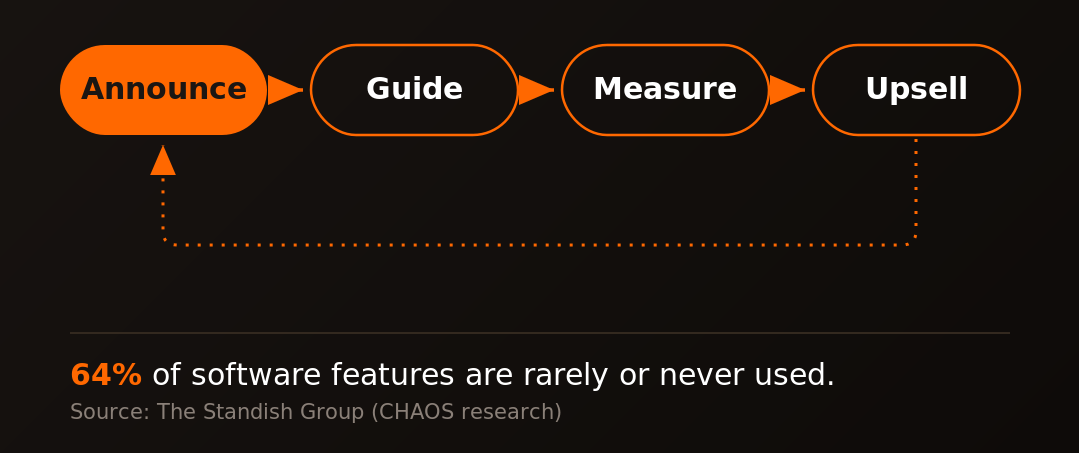
The fix isn't shipping less or announcing louder. It's treating every release as a loop, not an event. This article breaks down that loop - announce, guide, measure, upsell - and shows how to run it in-product so features actually get used, and used features turn into revenue.
Feature adoption is a communication problem, not a product problem
The instinct after a low-adoption launch is to blame the feature. Wrong instinct. The feature is usually fine. The moment of relevance was missed.
Consider the math. In a landmark Standish Group study of enterprise applications, 64% of software features were found to be rarely or never used - 45% never, another 19% rarely. Most of those features work exactly as designed. They just never got discovered at the point where a user needed them.
Here's what that sounds like in the wild. "One of our biggest bottlenecks is just making sure users are aware of new features we're rolling out - and we launch every one to two weeks," a B2B SaaS product lead told us. A logistics SaaS team put it more bluntly: "We do not have any channel where there's guidance in the app suggesting, 'okay, a new feature came out today.'"
That gap - between what you ship and what your user sees while logged in and working - is where adoption dies. Email gets ignored. Changelogs get bookmarked, never read. The only reliable place to reach a user about your product is inside your product, at the exact screen where the new feature matters. Everything else is a hope, not a channel.
Try the Product Fruits in-app announcements like banners, pop-ups and newsfeed - sign up a free trial or book a demo now!
The product release loop: announce, guide, measure, upsell
Great release teams don't "do a launch." They run a loop. Each release moves through four stages, and each stage has one job.The stages compound. An announcement without guidance creates awareness but no activation. Guidance without measurement means you're flying blind on what's working. And measurement without an upsell motion leaves the most valuable outcome - expansion revenue - on the table.
Run all four, and a release stops being a one-time broadcast. It becomes a repeatable system that turns shipped code into activated users, and activated users into growth. The rest of this article takes each stage in turn.
Step 1: Announce in context, not on a changelog nobody reads
The single highest-leverage change most teams can make: move announcements out of the changelog and into the product, targeted to the people the feature is for.
In-context announcements beat static pages because they arrive at the moment of relevance. A user opening the exact module you just upgraded is far more receptive than the same user scanning a release-notes page they'll never visit. Timing and place do the persuading.
You have three announcement formats, each for a different intensity:
- Pop-ups (modals) for high-impact launches that deserve a moment of full attention - a flagship feature, a pricing change, a beta invite.
- A "What's New" newsfeed that lives in your UI as a persistent, always-available hub of recent updates. It makes release notes feel professional and gives curious users a place to catch up on their own time.
- Banners for lightweight, non-blocking nudges - a strip at the top of the screen pointing to something new without interrupting the task at hand.
The multiplier on all three is targeting. Announce the new reporting feature to admins, not end users. Surface the healthcare-portal update to the specific portals that got it. As one team told us: "If we release a new feature, we want to announce it on some of those doctor portals, but not all of them." Segmentation is what turns an announcement from noise into a relevant, welcome signal.
This is exactly what teams value once it's in place. Jennifer H., a Solution Services Manager who moved to Product Fruits from Pendo, credits it with "ensuring all users are kept up-to-date on all new features, improvements, news, and operational difficulties" (G2). Keeping users current is the whole job of the announce stage.
Step 2: Guide users to their first real use
An announcement earns attention. Guidance earns adoption. The gap between "I saw it" and "I used it" is where most release loops break - and it's the stage teams most often skip.
Awareness is necessary but not sufficient. A user who reads about a feature and then can't find it, or tries it once and stumbles, churns straight back to their old workflow. So the announcement should hand off directly into guidance: click the pop-up, land in a walkthrough that gets you to first value.
For straightforward features, a tour (a short, card-by-card walkthrough) or a few hints (contextual tooltips that reveal functionality where it lives) do the job with zero code. For onboarding a bigger capability, a checklist breaks first use into a sequence of small, completable wins.
But real products aren't one-size-fits-all, and this is where Flows change the game. Flows are Product Fruits' canvas-based builder for guided experiences that actually respond to the person in front of them. Instead of one linear path, you build branching logic on a visual canvas: check whether a user has already enabled the feature, read and write their properties, react to what they've done, and route each user down the right path. An admin discovering a new integration and a first-week trial user exploring the same feature can get entirely different guidance from the same flow.
Flows also have Elvin, Product Fruits' built-in AI, available as a step - so guidance can answer a user's actual question mid-flow instead of dead-ending at a card. For the operator, that means less time scripting every edge case and more experiences that adapt on their own. Start small. Even a two-card flow is a valid flow. Then add branches as you learn what different users need.
A special case are features you want you users to try early on, watch this short clip where Trond-Daniel Kastnes Kvalvik from Mystore.no describes how they segment, target, onboard and guide users into new feature testing.
Step 3: Measure what actually landed
If you can't see who saw an announcement, who engaged, and who adopted, you're guessing. And guessing is how teams repeat launches that never worked.
Measurement closes the feedback half of the loop. For every announcement, tour, checklist, and flow, you want three numbers: how many people it reached, how many engaged, and how many went on to actually use the feature. The delta between reach and adoption tells you exactly where the loop is leaking.
Read those numbers by segment, not just in aggregate. A launch that hit 60% adoption with admins but 5% with end users isn't a 30% launch - it's two different stories that demand two different fixes. Maybe the end-user announcement targeted the wrong screen. Maybe the guidance assumed knowledge they didn't have. Segment-level data turns a vague "adoption is low" into a specific, fixable diagnosis.
This is also what makes the loop iterative. Low engagement on the pop-up? Rework the copy or the trigger. Strong clicks but weak adoption? The guidance is the weak link, not the announcement. High adoption in one segment and none in another? You've found your next experiment. Each release teaches you how to run the next one better - but only if you're measuring.
Teams that lean on this data feel the difference. One G2 reviewer put it plainly: "Being able to pull stats quickly for different features that are published live to make informed UX decisions... I am able to get what I need in a snap" (G2).
Step 4: Turn adoption into expansion
The stage most teams never build: using a release to drive revenue, not just usage. A new feature is the most natural upsell trigger you'll ever get.
Here's the motion. When you ship a feature that's gated to a higher plan, don't hide it from everyone else. Announce it to the users who can't access it yet - the ones on the tier below - with an in-context prompt that shows the value and offers the upgrade at the exact moment they want it. The feature sells itself because the user is already looking at the gap it fills.
The same in-app machinery that powers announcements powers this. A targeted pop-up or banner, shown only to a specific plan segment, pointing to a feature they'd need to upgrade to unlock. It's timely, relevant, and non-intrusive - the opposite of a cold expansion email. And because it's segment-targeted, paying customers who already have the feature never see the pitch.
Done well, this reframes every release. A launch isn't just an adoption event for existing users - it's a demand-generation event for expansion. The teams that build this fourth stage get two returns from a single feature: deeper usage from the users who have it, and upgrade pressure from the users who want it.
Running the whole loop in Product Fruits
Each stage above can be stitched together from separate tools. The friction - and the reason so many teams never close the loop - is the handoffs between them. Product Fruits exists to run the entire loop in one place, without pulling developers into every release.
Announcements, pop-ups, banners, and the "What's New" newsfeed cover the announce stage. Tours, hints, checklists, and Flows cover guidance, with branching logic and Elvin AI built in for experiences that adapt to each user. Segmentation runs underneath all of it, so every announcement and every upsell prompt reaches exactly the right audience. Analytics closes the loop with per-experience, per-segment data on what landed. And because it's no-code, your product and marketing teams can run the whole cycle without a deploy.
That consolidation is what reviewers keep returning to. Trond-Daniel K., a product manager who runs the platform in production, describes the payoff: "Now with Product Fruits we have everything in one place, features cross-communicate and we're able to share announcements, knowledge and guides from one place. We have never had this good an information flow between development, the organisation and the end users" (G2). Product Fruits holds a 4.7/5 across 238 reviews on G2 (as of July 2026), 4.7/5 on Capterra, and 4.6/5 on Gartner Peer Insights - with feature announcements and fast, low-developer setup among the most cited strengths.
Don't just take our word for it. See it for yourself in your product - book a demo or sign up a free trial with Product Fruits now. Getting it up and running takes minutes, as Trond-Daniel himself testifies below.
Frequently asked questions
What is feature adoption?
Feature adoption is the rate at which users discover, try, and regularly use a specific feature in your product. High feature adoption means users are getting value from what you ship. Low adoption usually signals a discovery or onboarding gap - the feature works, but users never notice it or never learn to use it at the moment it matters.
Why do users not notice new features?
Users miss new features because most launches are announced outside the product - in changelogs, emails, and community posts they rarely see. Users live inside your app, focused on their task. The only reliable way to reach them about a new feature is in-context, on the screen where that feature is relevant, at the moment they'd benefit from it.
How do you announce a new feature in-app?
Use in-app announcements targeted to the right segment. Pop-ups suit high-impact launches, a "What's New" newsfeed gives users a persistent hub for updates, and banners deliver lightweight, non-blocking nudges. The key is targeting: show each announcement only to the users the feature is for, on the screen where it applies, so it reads as relevant rather than as noise.
What's the difference between a product tour and a flow?
A product tour is a linear, card-by-card walkthrough - every user follows the same path. A flow is built on a visual canvas with branching logic: it can check user properties, react to behavior, and route different users down different paths. Tours are ideal for simple, one-path guidance. Flows are for adaptive experiences that respond to who the user is and what they've done.
How do you measure feature adoption?
Track three numbers per feature: reach (how many users saw your announcement or guidance), engagement (how many interacted), and adoption (how many actually used the feature, use your product analytics too for this). Read them by segment, not just in aggregate - adoption often varies sharply between user types, and segment-level data tells you exactly where and why the loop is leaking.
Can you use feature announcements to drive upsells?
Yes. A new feature gated to a higher plan is a natural upsell trigger. Show a targeted, in-context prompt to users on the tier below - highlighting the value and offering the upgrade at the moment they want the feature. Because it's segment-targeted, existing subscribers never see the pitch, and the offer arrives exactly when it's most relevant.
Close the loop, and launches start to land
Feature adoption doesn't fail because your features are weak. It fails because releases end at "announced" instead of running a full loop. Announce in context. Guide users to their first real use. Measure what landed, by segment. Then turn that adoption into expansion. Do all four, and every release stops being a broadcast into the void and becomes a repeatable engine for activation and growth.
Product Fruits runs that entire loop in one no-code platform - announcements, Flows, segmentation, and analytics working together, so your team ships value that actually reaches users. See it on your own product: book a demo or sign up free trial.


Weekly newsletter
Get the latest releases, tips, articles, and exclusive interviews delivered to your inbox weekly—no spam!