7 Best UserGuiding Alternatives Compared on Price (2026)


TL;DR
- UserGuiding is a well-rated, easy no-code onboarding tool. Teams leave when the price steps up and the Starter plan runs out: 1 active checklist, 1 survey, 1 banner.
- Best value overall: Product Fruits. Starter is $111/mo vs UserGuiding's $174/mo, and Pro costs 36% less than UserGuiding Growth at the same user count.
- Cheapest way in: Produktly (from €19/mo) or HelpHero (from $55/mo).
- Deeper analytics: Userpilot.
- Developer-friendly: Userflow.
- Enterprise options: Pendo, WalkMe or Whatfix.
UserGuiding is usually the tool teams pick because it's the affordable one. So it stings when it stops being affordable.
The pattern is familiar. You start on Starter, then you need a second checklist, or a second banner, and the next plan is double the price for the same number of users. Or the renewal quote simply comes in higher than last year.
This guide compares seven UserGuiding alternatives on what they cost, what the entry plan really includes, and the one catch you should know before you switch. It also covers what teams moving off UserGuiding tell us on discovery calls, and how to migrate without losing your guides.
What is UserGuiding?
UserGuiding is a no-code user onboarding platform for SaaS products. You install a snippet, then build product tours, checklists, hotspots, surveys, banners and a resource center without developer help. It also sells an AI Assistant for in-app answers and includes session replay.
It has a strong reputation: 4.7 out of 5 from 779 reviews on G2. Nothing in this guide says it's a bad tool. It says it's a tool whose pricing and plan limits push a lot of small teams to look around.
UserGuiding pricing in 2026
UserGuiding publishes three plans. Prices below are from its pricing page in September 2026.
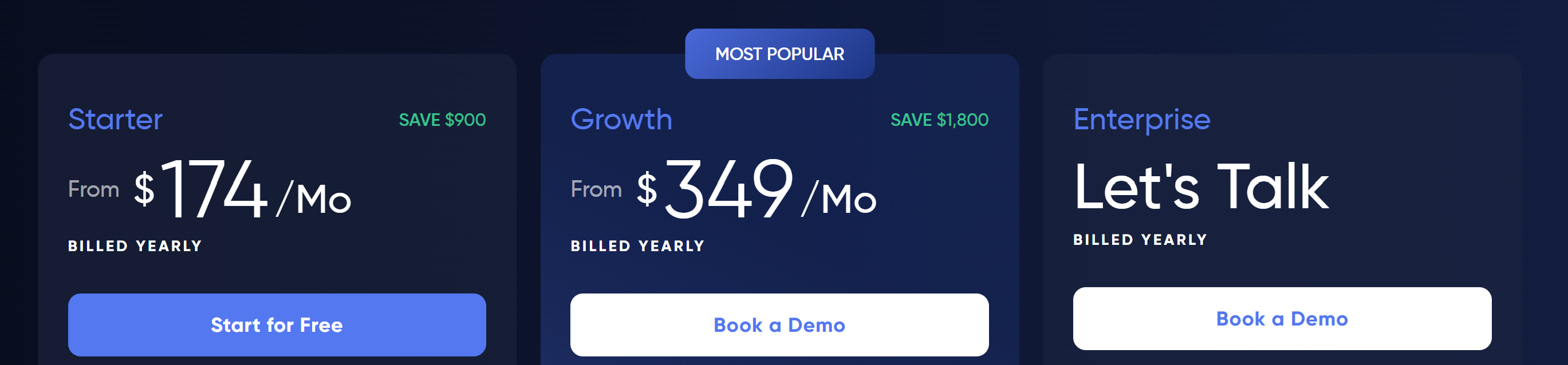
- Starter: $174/mo billed annually. 2,000 monthly active users (MAU), 15 active guides, 10 hotspots, 1 active checklist, 1 active survey, 1 active banner, 1 resource center, 10 segments, 1 theme.
- Growth: $349/mo billed annually. Same 2,000 MAU, 3 seats, 40 guides, 5 checklists, 5 surveys, 5 banners, 25 segments. Custom CSS, localization, A/B testing, advanced analytics and premium integrations are Growth-only.
- Enterprise: custom quote. Unlimited seats and content, SAML SSO, SOC 2 / GDPR / HIPAA compliance.
Monthly billing costs more: UserGuiding says paying annually saves $900 a year on Starter. There's no free plan, only a 14-day trial.
The AI Assistant is metered separately. Every account gets 50 free resolution credits, then it's $0.69 per resolved conversation.
Why teams look for UserGuiding alternatives
Starter is limited
Starter looks affordable until you try to run more than one checklist or banner. One seat means one person owns all onboarding. One active checklist, one survey and one banner means you're constantly switching things off to launch something new.
The next step up is a big one
Growth costs $349/mo billed annually, about $4,188 a year, for the same 2,000 MAU as Starter. You pay twice as much for features and seats, not for more users. Custom CSS alone is a Growth feature, which matters if you want guides to match your brand.
What G2 reviewers say
UserGuiding's G2 reviews are positive overall. The recurring complaints, per G2's own review summary, are limited customization, missing features and basic analytics, limited design and targeting options, and cost once you need advanced features.
"I don't feel the pricing is fair given the limitations around guides"
— UX Analyst, small business · G2
What teams switching complain about
We went back through our own sales calls from the past year with teams that were using UserGuiding, had used it, or were comparing it with us. The most common reasons for looking elsewhere are:
- Price at renewal. About a third of them. The plan got more expensive, or stopped feeling worth what they paid.
- Plan limits. Guide and segment caps, one domain per account, or targeting that couldn't read the user attributes they needed.
- Support. Slow replies, email-only help, or feature requests that went nowhere.
- Building guides took too long. Several teams said one tour could take days, or that guides were too fiddly to hand to a junior teammate.
To be fair to UserGuiding: many of those same teams said it works well and is easy to use. The complaints were mostly about price and limits, not the core product.
The 7 best UserGuiding alternatives for 2026
Here's the at-a-glance view, then a closer look at each tool, grouped by what you're leaving UserGuiding for. Prices are entry-level starting points. G2 ratings were checked in September 2026.
More power for the money
Product Fruits
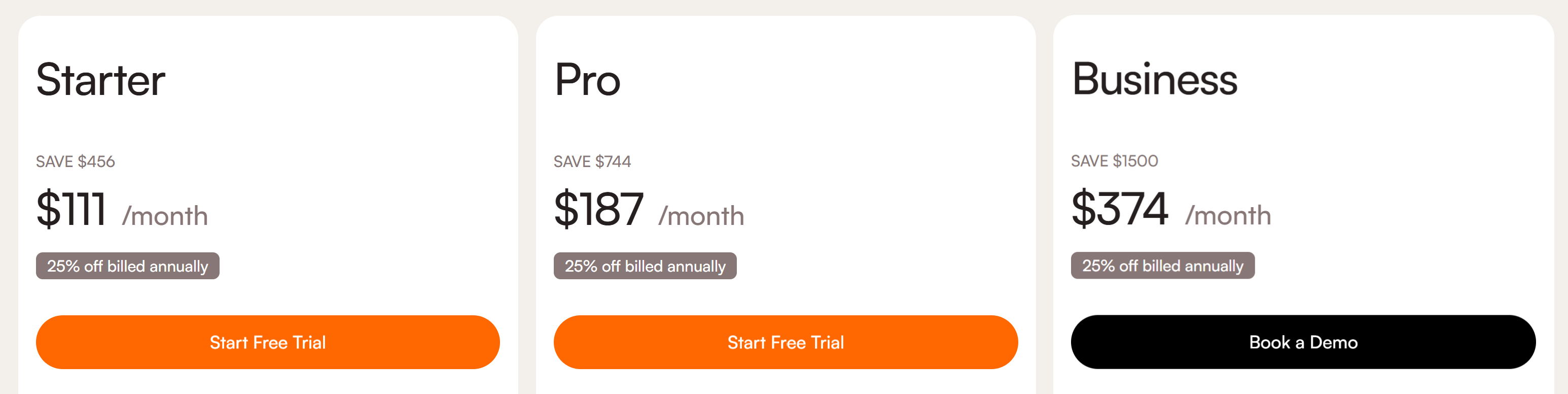
A no-code onboarding platform that bundles tours, hints, checklists, announcements, a newsfeed, a feedback widget, a knowledge base and Elvin (the AI onboarding assistant) under one published price. Starter is $111/mo billed annually for 1,500 MAU, 36% less than UserGuiding Starter, with 3 seats, 2 checklists and custom CSS included.
The AI does real work: you describe the guide you want and Elvin AI agent drafts it, which is what switchers mention most after price. The catch is plan gating. Flows with branching and conditions, surveys and NPS, custom events and integrations like HubSpot and Zapier start on Pro ($187/mo billed annually). More on how it compares below.
Userpilot
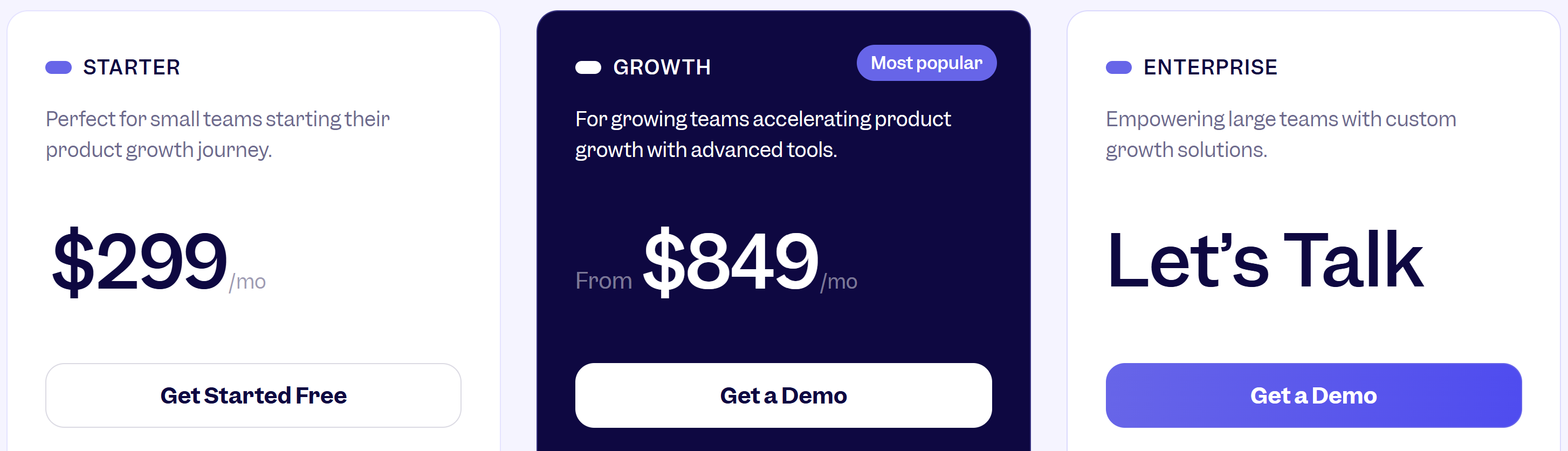
Pairs onboarding with deeper product analytics and audience targeting, from $299/mo billed annually. Worth it if product analysis is central to your role and you don't already have an analytics tool.
If you're leaving UserGuiding because of price, it's a step up in cost, not down. We compare it in more depth in our Userpilot alternatives guide.
Userflow
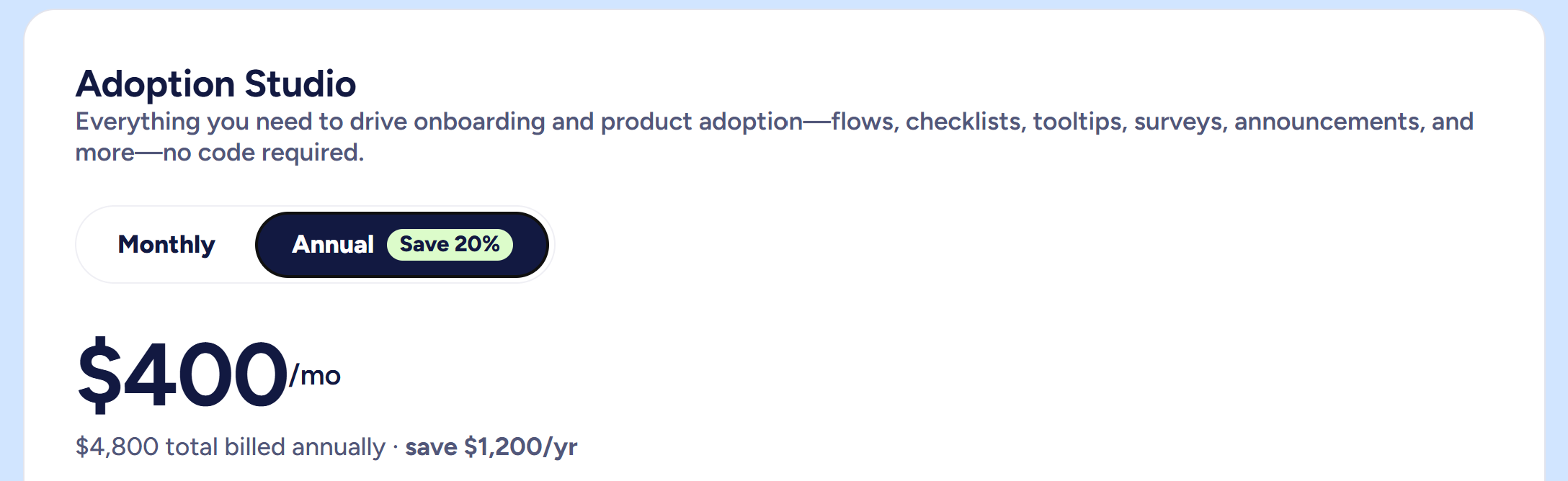
A polished, developer-friendly builder with strong segmentation and a good API. The highest G2 rating among the established tools, at 4.8.
Pricing starts at $400/mo billed annually and climbs with MAU, so it suits teams leaving UserGuiding for capability rather than to save money.
Chameleon
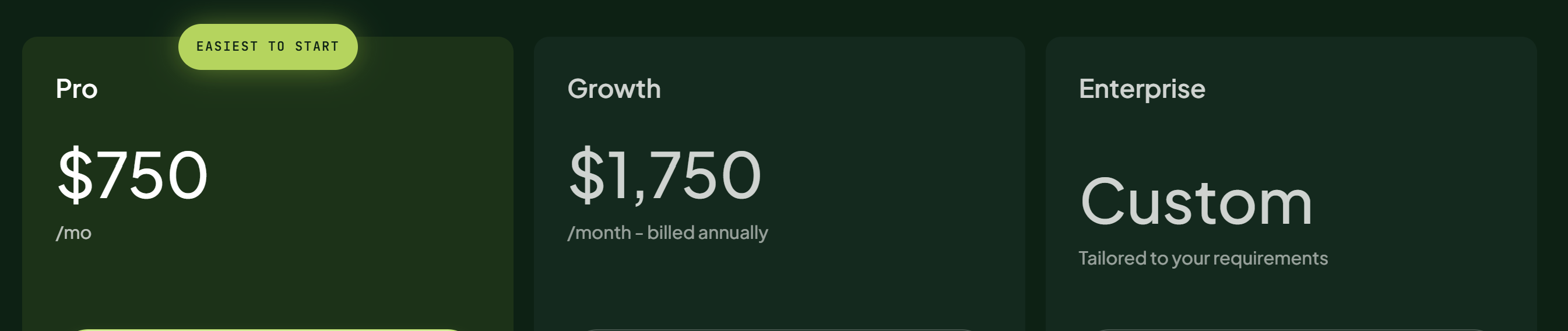
The most customizable experiences of the group, with fine control over styling and targeting. If your main UserGuiding complaint is "it doesn't look like our product", Chameleon addresses it.
The Startup plan begins at $279/mo and is limited; Pro jumps to $750/mo. That's a premium for polish.
Appcues
One of the most established names in onboarding, with tours, checklists, in-app messages and a resource center. Pricing is quote-only; the entry Start plan covers up to 3,000 MAU.
It's a fit for teams that want a sales-led relationship and have the budget. For most teams leaving UserGuiding over cost, it's the wrong direction. See our Appcues alternatives for small teams.
Cheaper and lighter
HelpHero
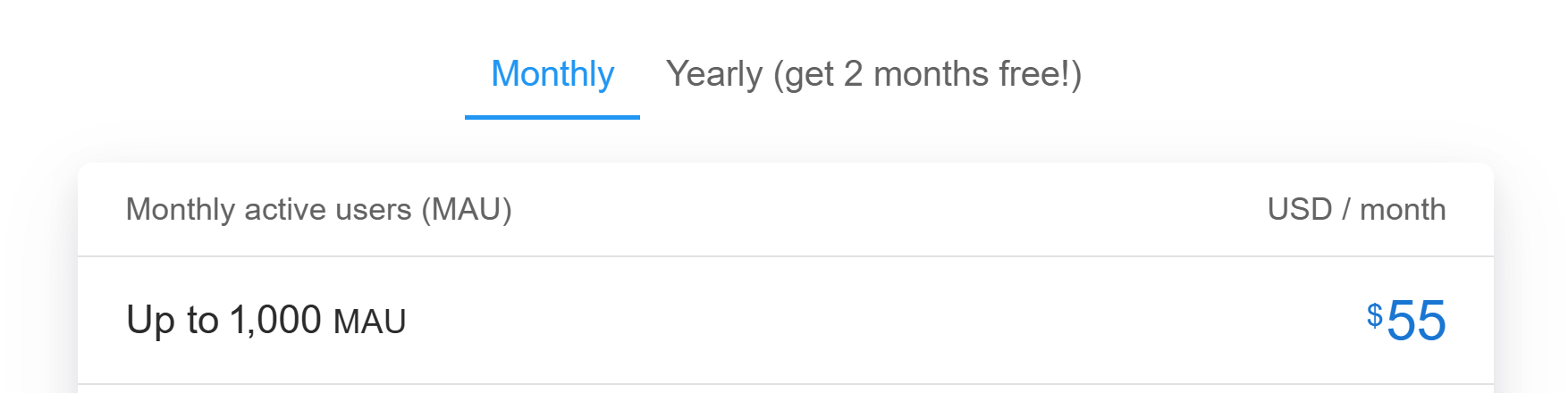
Does interactive tours and checklists, and does them cheaply: $55/mo for up to 1,000 MAU, with unlimited tours, checklists, hotspots and seats on every plan. It also has the best G2 score here, 4.9, though from only 18 reviews.
It won't cover surveys, announcements or a help center, so it's a poor fit if you're consolidating tools.
Produktly
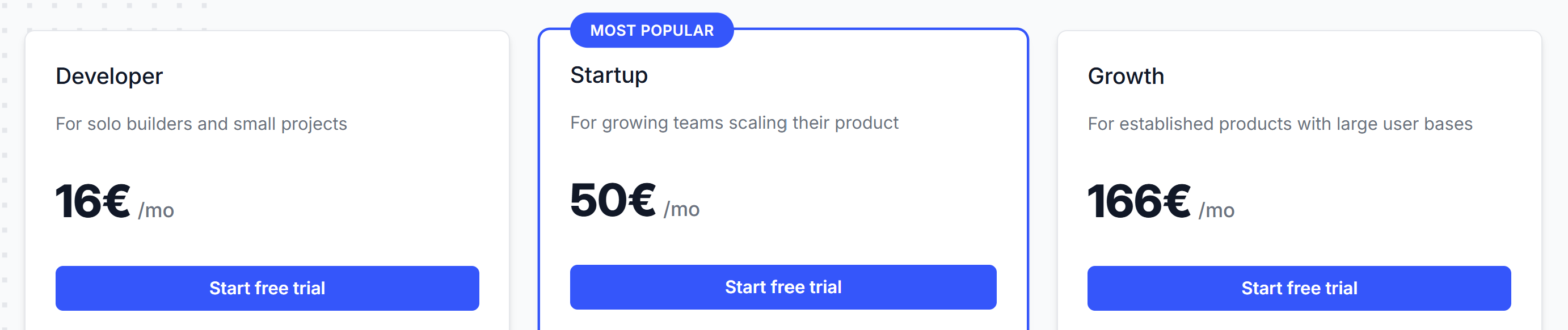
The lowest entry price in the category: a Developer plan at €19/mo (5 tours, 2 checklists, 3 team members) and a Startup plan at €59/mo with unlimited tours and checklists. Both come with a 14-day free trial.
A good fit for an early-stage team that needs tours live cheaply. It's a younger product with only three G2 reviews, so expect rough edges and fewer integrations than the established names.
Enterprise digital adoption platforms
Pendo, WalkMe and Whatfix show up in almost every "UserGuiding alternatives" list, so they're worth naming. They're digital adoption platforms built for large companies: product analytics, employee software training, and sales-led contracts to match.
If you're leaving UserGuiding because it got too expensive, these go the other way. We cover them in our Pendo, WalkMe and Whatfix alternatives guides.
A closer look at Product Fruits vs UserGuiding
Product Fruits prices by MAU in tiers. That makes the fair comparison depend on your user count, so here are both views.
At 1,500 MAU, Product Fruits Starter is $111/mo billed annually against UserGuiding Starter at $174/mo. That's 36% less, with unlimited banners instead of just 1.
At UserGuiding's 2,000 MAU base, you'd be on our 3,000-MAU tier. There, Starter is $149/mo and Pro is $224/mo billed annually. Pro is the like-for-like match for UserGuiding Growth, and it's 36% cheaper:
Three things stand out when teams switch.
AI that builds, not just answers. After price, the reason switchers mention most is AI. With Elvin Onboarding agent you describe a guide and it drafts it for you, which is also how you rebuild UserGuiding content quickly. Elvin then answers user questions from your own docs and can launch an on-demand guide when someone asks "how do I…?". Conversations come included in the plan, so the bill doesn't move with every question.
Flows instead of static guides. Flows are journeys built on a visual canvas. They connect tours, checklists and hints, and branch on what each user does. Starter includes linear Flows; branching and conditions start on Pro.
Humans on the other end. Live chat support is on every plan, Pro adds a solution engineer, and we help you move your existing content over rather than leaving you to rebuild alone.
"Setting up tours, announcements and hints is genuinely easy, even for someone non-technical... Their training materials (and Elvin! – their AI chatbot) answer pretty much every question I've had, and when something isn't covered, the team responds incredibly fast."
— Natalia F., Product Marketing Manager · G2
Where UserGuiding is ahead: more segments on the entry plan (10 vs our 5), session replay and A/B testing on Growth. If those matter most to you, weigh them.
How to migrate from UserGuiding
There's no direct import from UserGuiding into Product Fruits, so plan for a rebuild. Here's the order that works for the teams we've moved over.
- Start 30–60 days before your renewal. Most switchers time the move to their UserGuiding renewal date and run both tools for a few weeks rather than cutting over in a day.
- Audit what's actually used. Pull UserGuiding's guide analytics and carry over only the guides, checklists and resource center items users engage with. It's usually a shorter list than you expect.
- Keep user IDs and attributes the same. Send the same user ID and attributes to the Product Fruits snippet so your segments rebuild cleanly.
- Rebuild with AI, then refine. Describe each guide to Elvin Onboarding agent and edit the draft, or let our team help move your content.
- Switch off as you switch on. Unpublish each UserGuiding guide as its replacement goes live, so users never see two widgets or two tours at once. Remove the UserGuiding snippet last.
When UserGuiding is still the right pick
Switching has a cost, and UserGuiding is a good tool. Stay if:
- Your renewal price works for you and your team isn't hitting the Starter limits
- You want session replay and onboarding in the same tool
- Your guides are already built and working, and nobody has time to rebuild them
How to choose the right UserGuiding alternative
- You want more for less than you pay now: Product Fruits
- You only need tours and checklists, as cheaply as possible: Produktly or HelpHero
- Product analytics is central to your role: Userpilot
- You want a developer-friendly builder and have the budget: Userflow
- Design control matters most: Chameleon
- You're an enterprise rolling out software to employees: WalkMe or Whatfix
Frequently asked questions
What are the best UserGuiding alternatives?
For most teams, Product Fruits, Userflow, Userpilot, Chameleon and Appcues are the closest full-featured alternatives, with HelpHero and Produktly as cheaper, lighter options. Product Fruits is the best value of the group: its Starter plan costs 36% less than UserGuiding Starter.
What's the best UserGuiding alternative for a small team?
Product Fruits. The Starter plan is cheaper than UserGuiding's and includes Flows as well as the AI onboarding agent for drafting guides so a small team can ship onboarding fast.
What's the best UserGuiding alternative for small businesses?
Look for published pricing and enough in one plan to avoid buying extra tools. Product Fruits bundles onboarding, announcements, a knowledge base and AI help from $111/mo billed annually. If you only need tours, HelpHero at $55/mo is simpler.
Are there affordable UserGuiding alternatives?
Yes. Produktly (from €19/mo), HelpHero (from $55/mo) and Product Fruits (from $111/mo billed annually) all start below UserGuiding's $174/mo Starter plan.
Is there a free UserGuiding alternative?
Not one we'd recommend for production onboarding. UserGuiding itself no longer has a free plan, only a 14-day trial. Product Fruits, HelpHero and Produktly also offer 14-day free trials, and Produktly is the cheapest paid option at €19/mo.
How much does UserGuiding cost in 2026?
Starter is $174/mo and Growth is $349/mo, both billed annually for 2,000 MAU. Enterprise is quote-only. Monthly billing costs more, and the AI Assistant is charged separately at $0.69 per resolution after 50 free credits.
Why is UserGuiding pricing too high for some teams?
Starter caps you at 1 active checklist, survey and banner, so growing teams hit the limits quickly. The next plan, Growth, doubles the price for the same number of users. Rising renewal prices are the most common reason teams give for looking elsewhere.
How do I migrate from UserGuiding?
Start a month or two before your renewal, audit which guides users complete, keep user IDs and attributes consistent, rebuild the guides you're keeping in the new tool, and unpublish each UserGuiding guide as its replacement goes live. There's no direct import into Product Fruits, but our team will help you move your content.
Which UserGuiding alternative is right for you?
If UserGuiding still fits your budget and your plan limits, stay. If the renewal quote or the Starter limits are why you're here, the best alternative is the one that gives you more for the same money.
For most teams that's Product Fruits. Start your 14-day free trial (no credit card), or book a demo and we'll map your existing UserGuiding guides to Product Fruits before you commit to anything. Full plan details are on our pricing page.


Weekly newsletter
Get the latest releases, tips, articles, and exclusive interviews delivered to your inbox weekly—no spam!