Beyond Onboarding: How to Use In-App Flows as a Product Automation Engine


Your users onboarding is complete. That means your users' journey is still in the beginning.
Many product teams treat onboarding as a finite event. A user signs up, sees a welcome tour, clicks through a few steps, and that's it - the handoff is over. What happens on day two? Or day seven? What if a key feature goes untouched for two weeks?
The gap between "onboarding complete" and "user activated" is where most SaaS products lose customers. According to research by Mixpanel, the average SaaS product retains only about 20% of users after 8 weeks - and much of that churn happens not because the product is bad, but because users never got deep enough to discover its real value.
Traditional product tours can't solve this. They fire once, they're linear, and they have no memory. They can't wait. They can't check. They can't respond. That's precisely what Product Fruits Flows was built for.
What "Flows as an Automation Engine" Actually Means
When Martin Fišera, CPO of Product Fruits, presented Flows at the launch webinar, he was explicit about this: "It's not just about onboarding, it's not about adoption. We want to bring it to the next level. It's a system of action as well- it can do something for you."
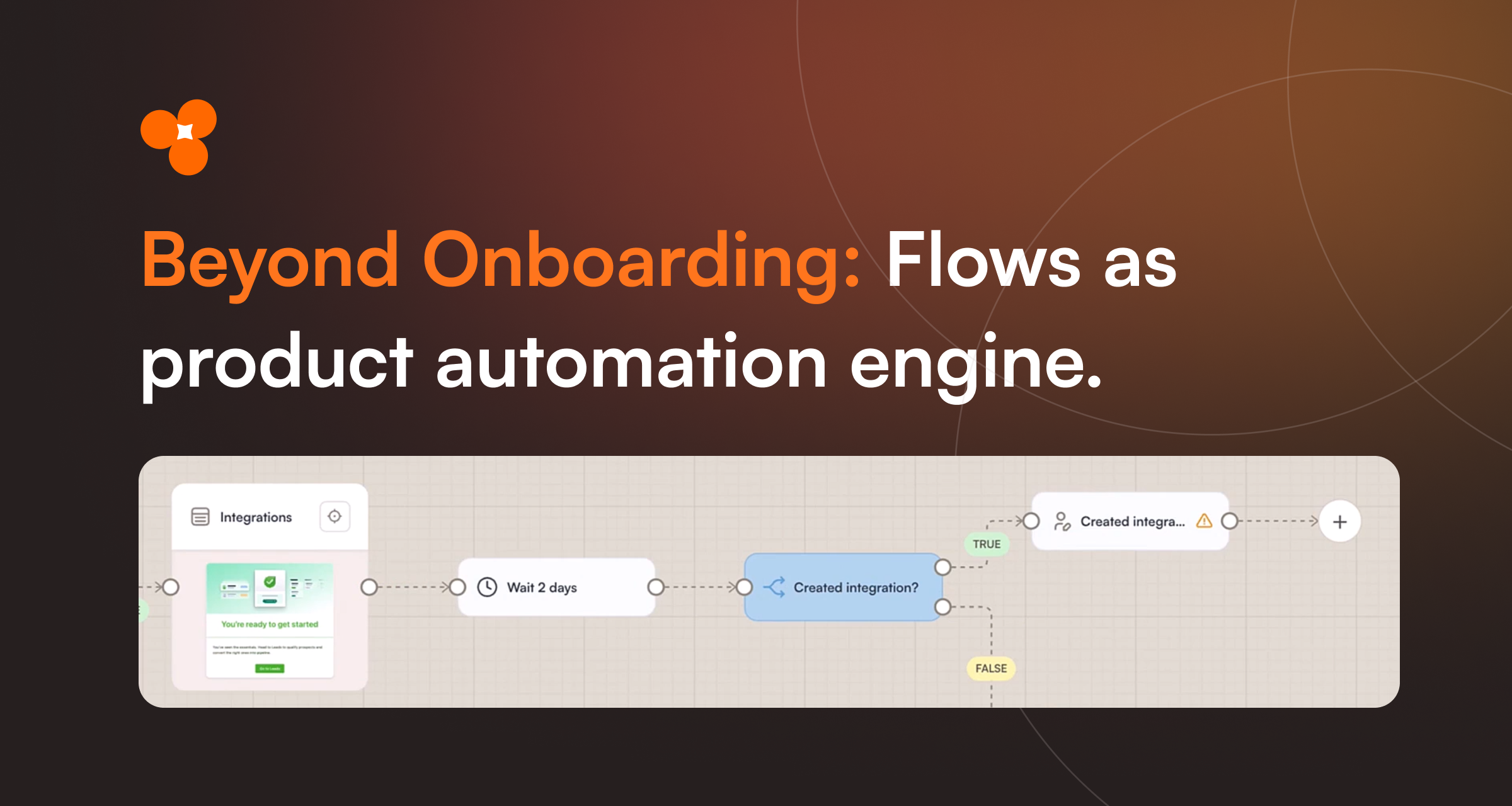
That word - action - is the key distinction. Flows doesn't just show users content. It can read data from your CRM before deciding what to show, wait a defined amount of time before taking the next step, check whether a user completed a specific action inside your product, write enrichment data back to HubSpot, and fire a Slack notification to your sales team when a signal triggers. This is a fundamentally different category of tool - closer to what teams typically stitch together with Zapier, Customer.io, or custom webhook logic - except it lives inside the product experience itself, where users actually are.
The Framework: Ask → Act → Check → Continue
Our Chief Product Officer Martin Fišera demoed how this framework works in a short demo during Flows live launch webinar, watch it here or read more below.
The clearest way to understand how Flows works as an automation layer is through a four-step pattern: Ask, Act, Check, Continue.
Ask- Trigger a flow at a meaningful moment. Optionally use a Discovery (an AI-guided conversational micro-survey) to learn something about the user before the automation begins.
Act- Based on what you know - from your CRM, user properties, or Discovery- the flow takes action. It might show a specific card, trigger an API call to load a contact record, or branch the user into a persona-specific path.
Check- After a defined waiting period - hours, days, whatever the use case demands - the flow re-evaluates. Did the user complete the action you hoped for? Did they connect an integration, invite a teammate, finish a workflow?
Continue- Based on the check, the flow branches: reinforcement for users who succeeded, intervention (or a proactive Elvin AI conversation) for users who didn't, and enrichment data pushed back to your CRM either way.
A Real Example: HubSpot Onboarding Automation
The third demo from the Flows launch webinar showed this end-to-end on a real CRM product. Here's what the flow does:
1. Load from HubSpot.
A welcome card shows to all users. Then a HubSpot properties node fetches contact data - specifically, whether they're tagged as an enterprise account.
2. Branch on CRM data.
A condition node reads the HubSpot property. Enterprise users are routed into an integrations-first onboarding path, because that's the "aha moment" for that segment.
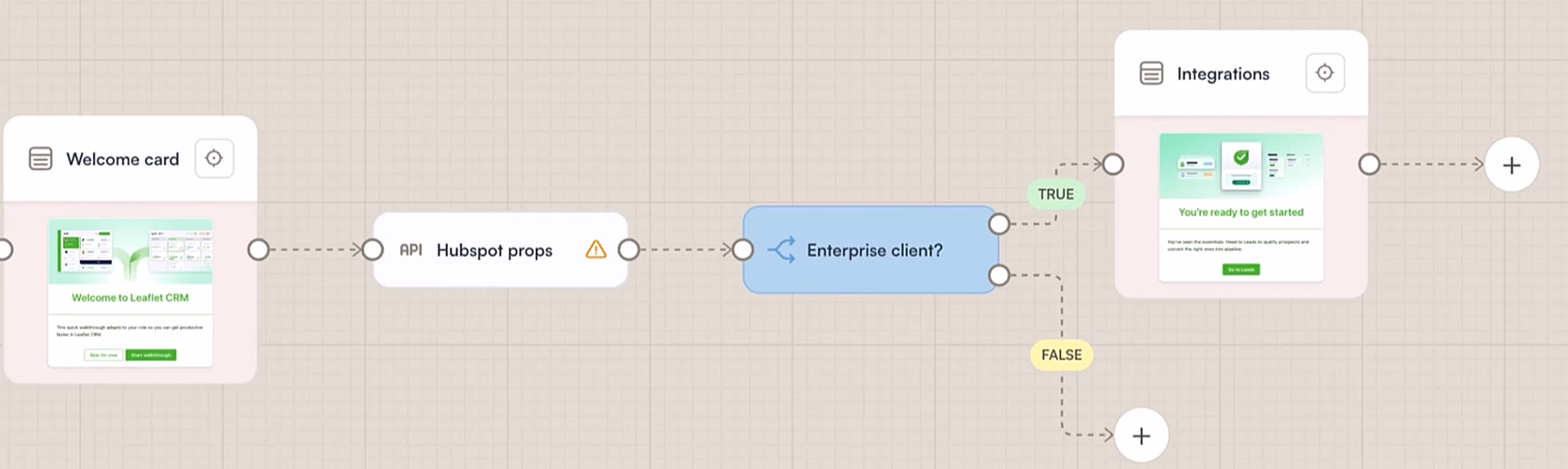
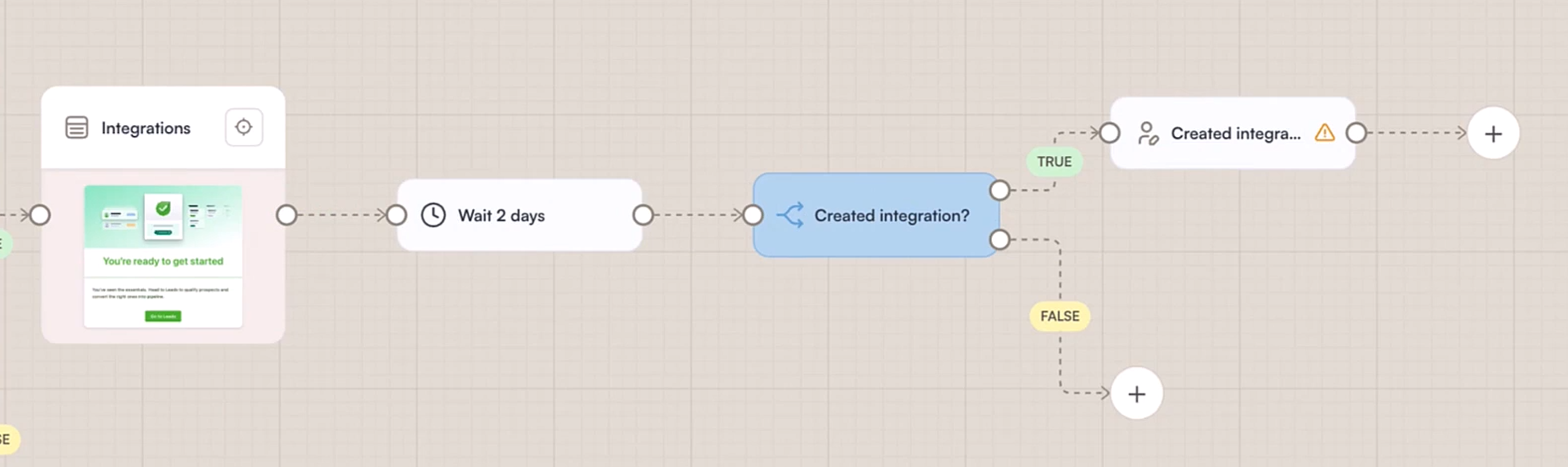
3. Wait two days.
A single node. No webhook, no cron job, no external scheduler.
4. Check if the integration was created.
After two days, the flow checks. Users who completed it move forward; users who didn't get a different path.
5. Enrich the user record.
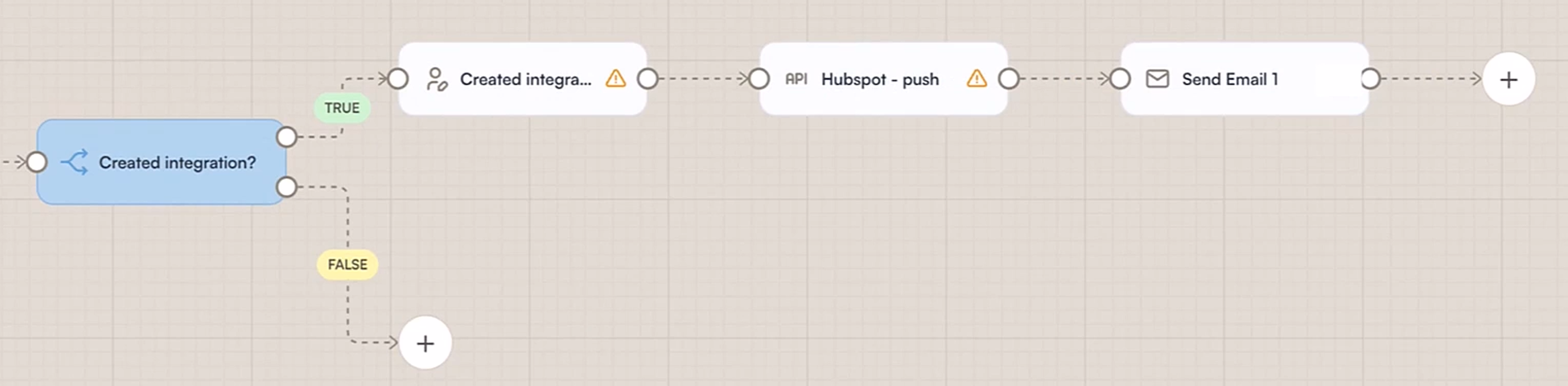
A property is written back to their Product Fruits profile- this user created an integration - and that property is now available across all future flows and segments.
6. Push to HubSpot.
The enrichment flows back to HubSpot, flagging the contact as a warmer lead and moving them down the sales funnel.
7. Notify the team.
A Slack message (or email) fires to the relevant sales rep. A concrete signal to act on, not a dashboard to check.
8. Fallback for non-completers.
Users who haven't created the integration after two days get Elvin, Product Fruits' AI assistant, opening proactively with pre-seeded context: "I noticed you haven't connected your integrations yet- here's how." No one falls through the cracks.
As Martin Fišera put it in webinar recording above: "You can have almost an entire flow without showing the user any card. It can transform some information and pass it further, reach it, and pass it further."
Why This Matters for Product-Led Growth
PLG companies have a specific problem: the product itself has to do the selling. There's no SDR nurturing every trial user. The gap between "signed up" and "saw enough value to convert" is entirely the product's responsibility.
OpenView's annual PLG benchmarks consistently show that companies where user behavior directly triggers sales and CS actions outperform on net revenue retention and expansion revenue. The critical variable isn't just the product experience - it's how well product behavior data flows into the tools your revenue team actually uses.
Flows closes exactly that loop. When a user completes a key action, your CRM knows. When a user stalls, your CS team knows. And the in-product experience keeps running regardless.
This kind of automation - reading from HubSpot, waiting, checking, pushing enrichment, notifying via Slack- would previously require a multi-tool stack: Product Fruits for the in-app layer, Zapier for automation logic, HubSpot workflows for CRM, and Customer.io for time-delayed messaging. Flows compresses all of this into a single visual canvas operated by a product manager without a single line of code.
What Kinds of Teams Should Use This Today
High-touch products with long activation cycles. If there's a meaningful action users need to complete in the first week or two, Flows monitors that action and responds automatically.
Products with CRM-dependent segmentation. If your go-to-market motion relies on account-level data in HubSpot, Flows lets that data drive the in-app experience directly - no manual segment syncing.
Teams without dedicated engineering support. The full automation logic- API calls, condition branching, time delays, CRM writes - is assembled on a drag-and-drop canvas.
Companies scaling from startup to mid-market. As your user base grows, manual CS follow-up stops scaling. Flows automates the high-signal moments so your team focuses on conversations that actually need a human.
Try it now
Flows are available on all Product Fruits plans (with some advanced fucntions being plan dependent) - book a demo, to see what Flows really can do.
FAQ
What is in-app onboarding automation?
Using software to trigger and sequence user experiences based on behavior, time, or external data - automatically. Unlike a static tour, an automated flow can wait, check conditions, and respond differently depending on what a user has or hasn't done.
Can Product Fruits Flows connect to HubSpot?
Yes. Flows includes an API node that reads HubSpot properties and pushes enrichment data back when users complete key actions - feeding product behavior directly into your CRM and sales pipeline.
How is Flows different from Zapier or Customer.io?
Those tools operate outside the product. Flows combines the in-app layer (cards, AI chat) with the automation logic (conditions, delays, CRM reads/writes, Slack alerts) in a single visual canvas.
Do I need a developer?
No. All of it- API calls, time delays, condition branching, CRM enrichment - is configured on a visual drag-and-drop canvas in the Product Fruits admin.
What happens to users who stall?
Flows routes non-completers to a different path, including opening Elvin proactively with pre-seeded context. No one falls through silently.


Weekly newsletter
Get the latest releases, tips, articles, and exclusive interviews delivered to your inbox weekly—no spam!