Product Fruits MCP: Connect ChatGPT and Claude to Your Onboarding Data


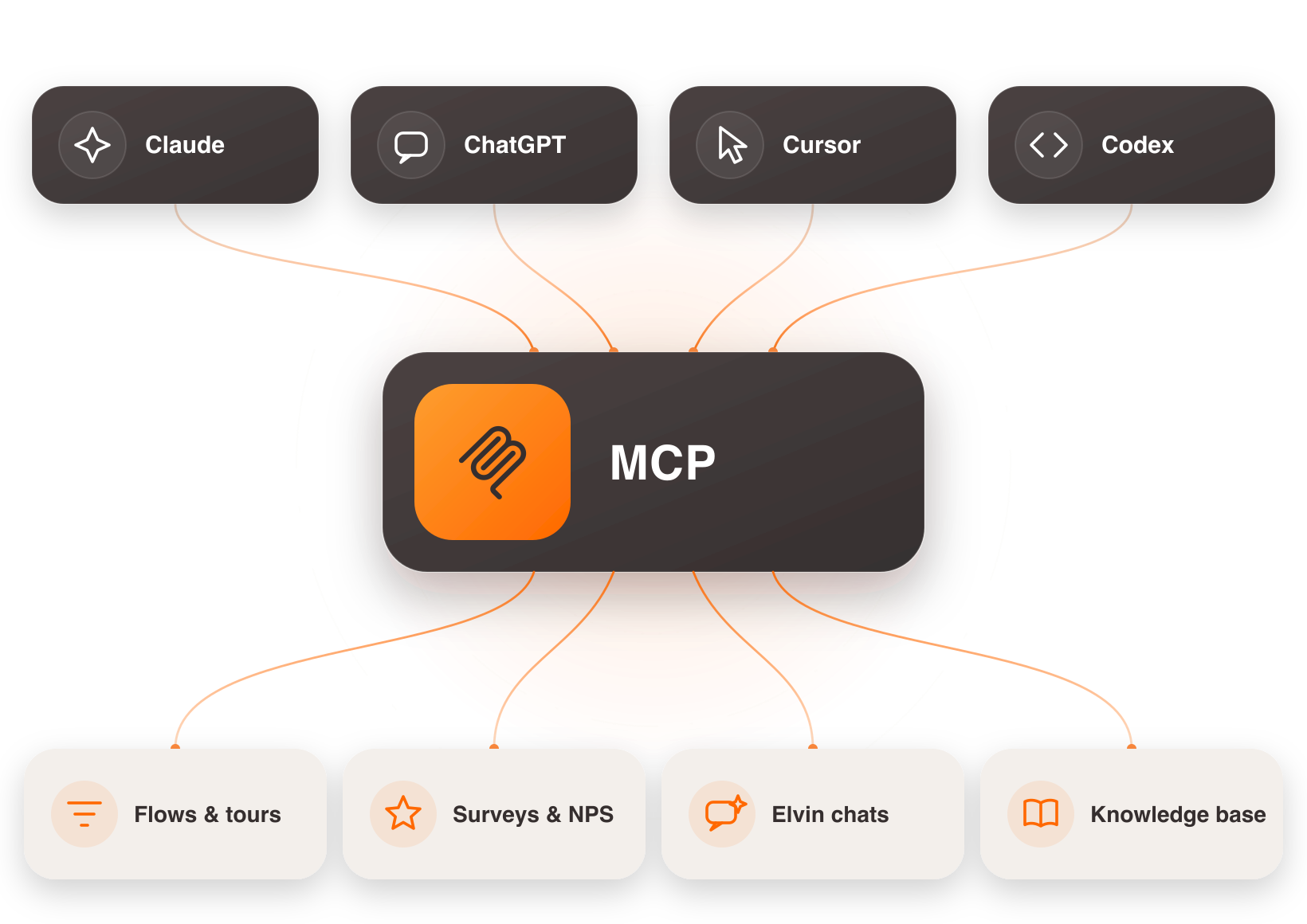
Product Fruits MCP is a free, read-only connection that lets your AI assistant — ChatGPT, Claude, Cursor, or Codex — answer questions from your live Product Fruits data. You ask about your onboarding in plain language, and your assistant reads the answer straight from your account. No dashboard, no API key, about two minutes to set up.
Today it's live for everyone. Here's what it is, what you can ask it, whether it's safe to point AI at your product data, and how to switch it on.
What is Product Fruits MCP?
MCP — the Model Context Protocol — is the open standard that lets AI assistants connect to the tools you already use. Product Fruits MCP uses it to give your AI read access to your Product Fruits account: your onboarding flows, tours, surveys and NPS, your knowledge base, your Elvin support conversations, and user activity.
Instead of copy-pasting screenshots and CSVs into ChatGPT, your assistant looks things up itself — and answers in plain language, from your real numbers.
Can I connect ChatGPT to my onboarding tool?
Yes. If your user onboarding runs on Product Fruits, you can connect it to ChatGPT — and to Claude, Cursor, or Codex — through MCP. You sign in with your Product Fruits account, add the connector in your AI client, and start asking. There's no code, no API key to generate, and no separate seat to buy.
What can it do?
Once connected, you can ask your AI things you'd normally open a dashboard for — and some things a dashboard can't answer at all:
- "Which step of my onboarding loses the most users?"
- "How is my onboarding doing this month — and what should I fix first?"
- "What did users ask in support this week that our help docs don't cover?"
- "Summarise this month's NPS responses and the top themes."
That third one is the part most tools can't do: Product Fruits MCP can read your real support conversations and cross-reference them against your knowledge base, so it tells you what your users keep asking that your docs don't answer. That's not analytics — it's listening.
We tested 40 prompts on our own account before launch and wrote up every one, including the ones that surprised us: 40 tested prompts to ask ChatGPT about your product data →
Is it safe to give AI access to my product data?
This is the right question to ask, and we built the answer into the product.
Product Fruits MCP is read-only — your AI can look, but it can't create, edit, or delete anything. You connect with your Product Fruits sign-in, not a pasted API key, so there's no admin credential sitting in a chat window, and your assistant only ever sees what your own account is allowed to see. Your data flows through your own AI client under your existing agreement with that vendor; Product Fruits sends nothing to model providers on your behalf.
For most teams this is the safest possible first step into AI on their product data. Worst case, you get an answer you didn't want.
How do I connect Product Fruits MCP?
It takes about two minutes:
- Sign in to Product Fruits and open the MCP connection settings.
- Add the connector in your AI client — ChatGPT, Claude, Cursor, or Codex — using your Product Fruits sign-in.
- Ask. Start with "Give me an overview of my Product Fruits workspace," then follow your curiosity.
No API keys, no developer, and it's free on every plan.
What does Product Fruits MCP cost?
It's free on every Product Fruits plan — no add-on, nothing metered. Read-only access is available today. Write access — where your AI can build in Product Fruits, not just read it — is on the roadmap, once our permission model for AI actions is fully hardened. Your AI should earn trust before it gets a pen.
Which product-adoption platforms have an MCP server?
A growing number now do, Product Fruits among them. The differences are in the details. Product Fruits MCP is read-only by default, connects with your sign-in rather than a pasted API key, and reaches beyond analytics into your support conversations and knowledge-base gaps — so it can tell you not just what's happening in your funnel, but what your users are actually asking. If you're comparing options, those are the things worth checking on any platform's MCP.
Connect it in about two minutes
Sign in with your Product Fruits account and point your AI at your onboarding.
New to Product Fruits? Start free — get your onboarding live in about 15 minutes, then connect your AI.
FAQ
Is Product Fruits MCP free?
Yes — it's included on every Product Fruits plan at no extra cost, with no metering. Read-only access is available now; write access will follow later.
Do I need an API key or a developer to set it up?
No. You connect with your Product Fruits sign-in, add the connector in your AI client, and start asking. Setup takes about two minutes.
Which AI assistants does it work with?
Any assistant that supports the open MCP standard, including ChatGPT, Claude, Cursor, and Codex.
Can the AI change or delete anything in my account?
No. The connection is read-only — your AI can read your data but cannot create, edit, or delete anything.
What data can it access?
Your onboarding flows, tours, surveys and NPS, knowledge base, Elvin support conversations, and user activity — everything your own account is allowed to see, and nothing more.


Weekly newsletter
Get the latest releases, tips, articles, and exclusive interviews delivered to your inbox weekly—no spam!