What Are the Best No-Code User Onboarding Solutions for User Activation in 2025?


User onboarding isn't just about showing users around your product—it's about getting them to experience real value fast enough that they stick around - the User Activation. In 2025, the difference between a thriving SaaS product and one that struggles with churn often comes down to one thing: how quickly you activate new users.
But here's where most companies get stuck: building effective onboarding experiences traditionally required engineering resources, weeks of development time, and constant iteration. That's where no-code user onboarding solutions come in.
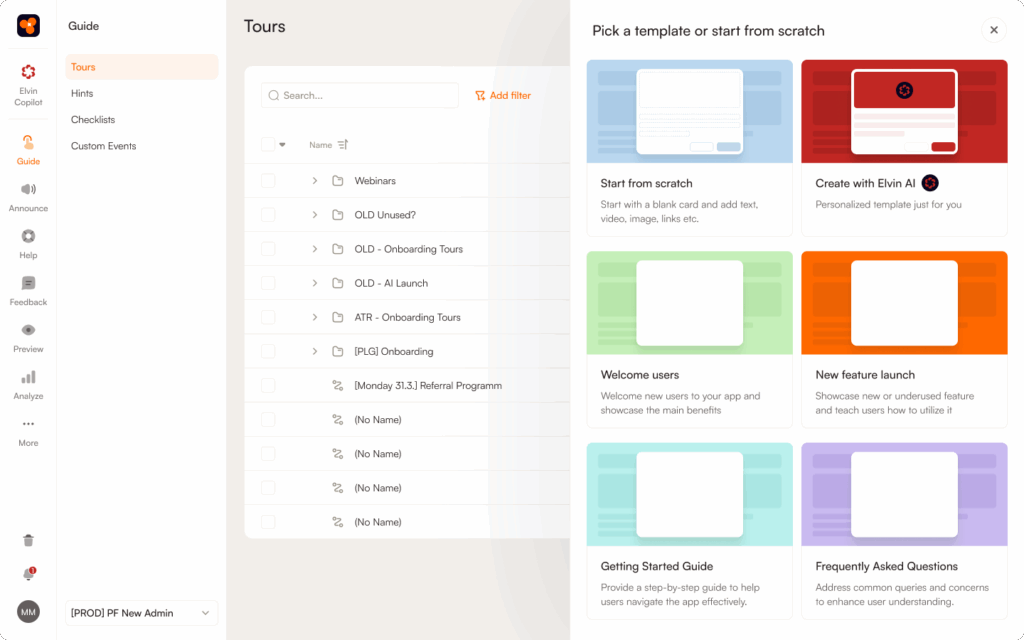
In this comprehensive guide, we'll explore the best no-code platforms for driving user activation in 2025, with a special focus on what most comparison articles miss: the critical difference between onboarding and activation, how to choose tools based on your specific use case, and why AI-powered automation is becoming non-negotiable.
TLDR on how to choose the best user activation tool
When evaluating no-code onboarding solutions, you need to ask:
- Can this tool help me identify and track activation events?
- Does it provide analytics to measure activation rates?
- Can I create personalized flows that guide users toward activation milestones?
- Does it support progressive onboarding beyond initial activation?
Tools that only offer UI pattern creation without activation-focused analytics will leave you flying blind.
Understanding User Activation vs. User Onboarding
Why the Distinction Matters
Most articles use "user onboarding" and "user activation" interchangeably. They're not the same, and understanding the difference is critical for choosing the right tool.
What is User Onboarding?
User onboarding is the comprehensive process of welcoming and guiding new users through your product's features and functionality. It encompasses multiple stages and touchpoints, from the signup page to feature discovery to ongoing education.
What is User Activation?
User activation is the specific moment when a user experiences the core value of your product for the first time—often called the "aha moment." It's a critical milestone within the broader onboarding process.
The relationship: Activation is a vital step of user onboarding, not a separate process. This means your onboarding tool needs to do more than create pretty tooltips—it needs to drive users toward specific activation milestones.
Why should you use a no-code user onboarding solution to activate your users
The case for no-code onboarding platforms has never been stronger. Here's why:
1. Speed to Market is Everything
Product teams that can iterate on onboarding flows weekly see 25% higher activation rates than those who wait for quarterly engineering sprints. No-code tools let product managers and growth teams ship onboarding improvements in hours, not weeks.
2. Engineering Resources Are Precious
In 2025, engineering teams are focused on core product features and AI integrations. Asking them to build custom onboarding flows, update tooltips, or create in-app surveys is an inefficient use of technical talent.
3. The Cost of Poor Activation Is Massive
The data is clear: improving user activation by 25% leads to an MRR increase of 34%. Yet the average activation rate for freemium and free trial users sits between just 20-40%. No-code tools make it economically feasible to constantly optimize activation.
4. Personalization at Scale
Modern users expect personalized experiences. No-code platforms with segmentation capabilities let you create tailored onboarding flows for different user personas, use cases, and behavior patterns without building complex logic trees in code.
What Key Features should you Look for When choosing User Activation Tools
Not all no-code onboarding platforms are created equal. Based on our analysis of the top solutions in 2025, here are the must-have features for driving user activation:
Core Onboarding UI Patterns
- Product tours & walkthroughs - Step-by-step guidance through key workflows
- Interactive checklists - Gamified progress tracking (average completion rate: 19.2%)
- Tooltips & beacons - Contextual hints that highlight features
- Modals & slideouts - Announcement and engagement prompts
- Hotspots - Draw attention to specific UI elements
Activation-Focused Capabilities
- Custom event tracking - Trigger flows based on user actions
- User segmentation - Target specific personas or behavior cohorts
- A/B testing - Optimize flows based on data, not guesswork
- Activation analytics - Track time-to-value, completion rates, and activation milestones
- Goal tracking - Measure which flows drive desired outcomes
Implementation & Integration
- No-code visual builder - WYSIWYG/drag-and-drop interface
- Native integrations - Connect to your CRM, analytics, and automation tools
- Chrome extension - Build flows without touching your codebase
- Mobile & web support - Consistent experiences across platforms
- API access - Custom event tracking and programmatic control
Advanced Features (2025 Essentials)
- AI-powered content generation - Auto-create tour copy and announcements
- Predictive analytics - Identify at-risk users before they churn
- Multi-language support - Localization without engineering work
- Self-service help centers - Reduce support tickets with in-app documentation
- Resource center - Centralized hub for guides, videos, and support
What are the Best No-Code User Onboarding Solutions for user activation?
After analyzing feature sets, pricing, user reviews, and activation capabilities, here are the top no-code onboarding platforms for 2025:
1. Product Fruits - Best AI-Powered All-in-One Platform
Product Fruits stands out in 2025 as the first platform to fully integrate AI automation into every aspect of user onboarding and activation. If you're looking for a single platform that handles everything from welcome tours to support deflection without requiring a design team, Product Fruits delivers.
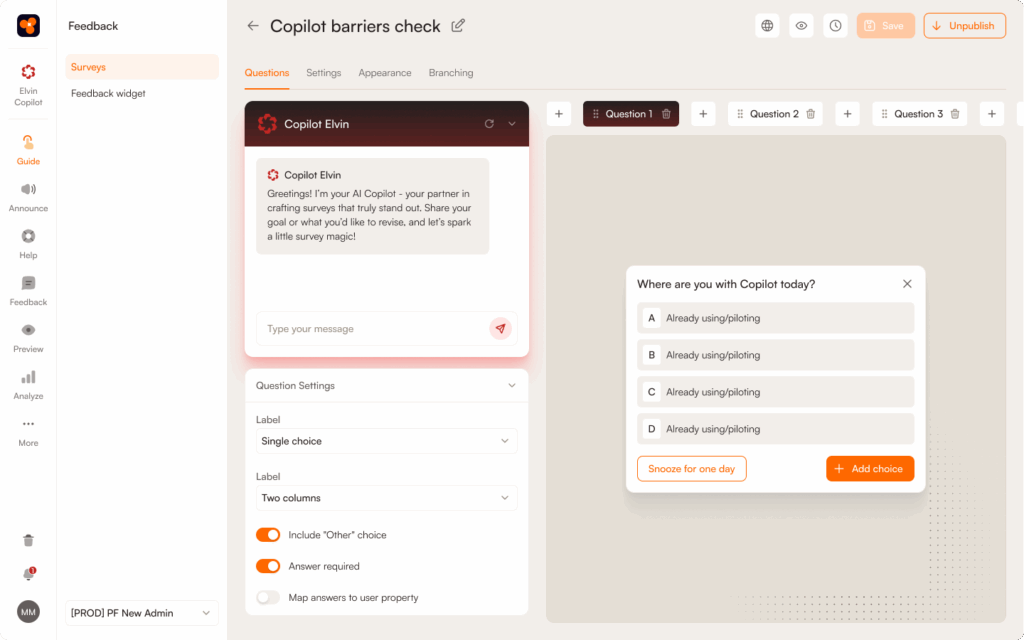
Why Product Fruits Excels:
Industry-First AI Automation - Product Fruits was the first Digital Adoption Platform to introduce AI-powered onboarding, and this head start shows. Their AI doesn't just suggest copy—it analyzes your entire product interface and automatically generates complete, professional onboarding flows in seconds.
Here's what that means practically: A task that would take your team 4-6 hours (writing copy, designing steps, sequencing flows) now takes 5 minutes. You describe your feature, the AI generates the tour with professional copy, optimal sequencing, and strategic highlighting. You can launch immediately or customize to match your brand voice.
Real-world impact: Teams report shipping onboarding updates 10x faster than with traditional tools. Instead of quarterly onboarding updates, you can iterate weekly or even daily based on user feedback.
Comprehensive Feature Set - Unlike competitors that excel in one area (analytics, experimentation, etc.), Product Fruits offers everything you need in one integrated platform:
- Interactive tours and guides - Step-by-step walkthroughs for complex workflows
- Onboarding checklists - Gamified progress tracking that boosts completion rates by 40%
- Contextual hints, beacons, and tooltips - Just-in-time guidance triggered by user behavior
- In-app announcements - Feature launches and updates with AI-generated content AND images
- User feedback widget - Capture mood, bug reports, and feature requests without leaving your app
- Complete help center (Life Ring Button) - Self-service support hub reduces tickets by 30-40%
- Built-in onboarding analytics - Track completion rates, time-to-value, and activation metrics
- Custom event triggering - Launch flows based on specific user actions or milestones
The all-in-one advantage: Most competitors require you to integrate 3-4 separate tools (onboarding + analytics + feedback + help center). Product Fruits consolidates everything, eliminating integration headaches and reducing your monthly SaaS spend.
AI Copilot for Support Deflection Product Fruits includes an AI assistant that lives inside your product, answering common questions in real-time. When a user gets stuck, they ask the copilot instead of opening a support ticket.
Real numbers: Companies using the AI copilot report 35-40% reduction in support tickets during onboarding, while activation rates increase because users get unstuck immediately instead of waiting for email responses.
When should you use Product Fruits to build no-code user onboarding flows to activate users:
- Your team is small or resource-constrained - The AI does the heavy lifting that would normally require designers and copywriters
- You want to move fast Ship onboarding improvements in hours, not weeks
- You're expanding internationally - Strong localization features without paying per-language premiums (some competitors charge $40/language)
- You need an all-in-one stack - Tired of integrating multiple tools for onboarding, feedback, help docs, and analytics
- You're a product-led growth company - Built specifically for PLG models where onboarding = revenue
- You have both simple and complex onboarding needs - Scales from basic tours to sophisticated, multi-path flows
- Budget matters but you won't compromise on features - Enterprise capabilities at mid-market pricing
When to Look Elsewhere:
- You primarily need mobile app onboarding - Product Fruits excels at web apps; if you're primarily mobile-first, consider Appcues or Pendo
- You have unlimited budget and want the absolute deepest analytics - Pendo offers slightly more comprehensive analytics (though at 3-5x the price)
- You already have a sophisticated analytics stack and only need UI patterns - If you've invested heavily in Amplitude/Mixpanel and just need tooltip/tour creation, Userflow might be more lightweight
Pros of using Product Fruits as a no-code user onboarding solution to activate users:
- Industry-leading AI automation saves massive time
- All-in-one platform eliminates integration complexity
- Best price-to-feature ratio in the market
- Fastest time-to-value (launch in under a day)
- Strong international/localization support
- Built-in analytics without external dependencies
- No design skills required (AI handles it)
- AI copilot reduces support burden
- Continuous updates and new AI features
Cons of using Product Fruits as a no-code user onboarding solution to activate users:
- Primarily web-focused (responsive but not native mobile SDKs)
- Analytics, while strong, aren't as deep as Pendo's enterprise-level capabilities
- A/B testing exists but isn't as robust as Appcues' experimentation suite
- Still building out some enterprise compliance features (though improving rapidly)
Here’s how a real world use case would look like:
Scenario: A Series A SaaS company with 50 employees launches a new dashboard feature. They need to onboard 10,000 existing users to the new UI without overwhelming their 2-person support team.
With traditional tools: Product manager spends 6 hours writing tour copy, designer creates mockups, engineer implements custom logic, QA tests across browsers. Timeline: 2-3 weeks. Support tickets spike anyway because tours miss edge cases.
With Product Fruits: PM describes the feature to AI (10 minutes), AI generates complete tour with professional copy and optimal sequencing (2 minutes), PM customizes for brand (15 minutes), launches with event-based targeting (5 minutes). Timeline: Same day. AI copilot answers edge-case questions automatically, preventing ticket spike.
Result: 10x faster launch, 40% fewer support tickets, higher activation rate because users see the new feature immediately instead of 3 weeks later.
Pricing: Transparent pricing starting at affordable rates for startups, with custom enterprise plans. Most companies find Product Fruits 30-50% less expensive than Appcues or Userpilot while offering comparable or superior features.
Bottom line: Product Fruits is the best choice for 70-80% of SaaS companies. It delivers enterprise-level capabilities with startup-friendly pricing and AI automation that multiplies your team's productivity. Unless you have very specific needs (deep mobile focus, unlimited budget for enterprise analytics, etc.), Product Fruits should be your first evaluation.
Learn more on how the Product Fruits Platform works or check out the AI Features in Action.
2. Userpilot - Best for Product Teams Focused on Analytics
Userpilot is a product growth platform that tightly integrates onboarding with product analytics. If your team lives in data and needs to deeply understand user behavior patterns alongside onboarding flows, Userpilot delivers analytics depth that most competitors can't match.

Why Userpilot Stands Out:
Analytics-First Philosophy Unlike tools that bolt analytics onto onboarding features, Userpilot builds everything around data. You get native product analytics for tracking feature usage, funnel analysis for understanding drop-off points, and cohort analysis for comparing user segments—all without requiring external analytics tools like Amplitude or Mixpanel.
What this means practically: You can see not just whether users completed your onboarding checklist, but exactly which steps correlate with long-term retention, how different user segments behave differently, and which paths through your product lead to the highest activation rates.
Advanced Segmentation & Personalization Userpilot's segmentation engine is among the most sophisticated in the category. You can create highly specific user segments based on:
- Product usage patterns (e.g., "used feature X but not Y in last 7 days")
- Demographic data (company size, role, industry)
- Custom event combinations
- Behavioral signals
Then deliver completely different onboarding experiences to each segment. This is powerful for complex B2B products where different user roles need radically different guidance.
Comprehensive Feature Set:
- Product tours, tooltips, slideouts, modals, and hotspots
- Onboarding checklists with progress tracking
- In-app surveys and NPS collection
- Resource center for self-service help
- Goal tracking tied to business metrics
- Retention analytics and churn prediction
When should you use Userpilot to build no-code user onboarding flows to activate users:
- You're a data-driven product team You make decisions based on detailed analytics, not gut feelings
- You have complex segmentation needs - Different user personas need significantly different onboarding paths
- You want analytics and onboarding in one platform - Tired of switching between Amplitude/Mixpanel and your onboarding tool
- You're optimizing for retention, not just activation - You need to track long-term behavioral patterns
- You have dedicated product ops/growth roles - Someone will invest time in learning and optimizing the platform
- Your product has a longer, more complex onboarding journey - B2B tools with multiple user roles and use cases
When to Look Elsewhere:
- You need to ship onboarding fast - Steeper learning curve means longer time-to-value than Product Fruits
- Your team is small or non-technical - The depth of analytics requires expertise to leverage fully
- Budget is tight - Premium pricing (starting around $299/month, scaling to $1,000+/month) is expensive for early-stage startups
- You want AI-powered content generation - No AI features to speed up tour creation
- You prioritize experimentation over analytics - Appcues has stronger A/B testing capabilities
Pros of using Userpilot as a no-code user onboarding solution to activate users:
- Best-in-class product analytics without external tools
- Incredibly sophisticated segmentation engine
- Excellent retention and cohort analysis
- Strong goal tracking tied to business metrics
- Solid A/B testing capabilities
- Supports both web and mobile (React Native)
- Resource center feature for self-service
- Good integration ecosystem
Cons of using Userpilot as a no-code user onboarding solution to activate users:
- Premium pricing (30-50% more expensive than Product Fruits)
- Steeper learning curve, longer onboarding time
- No AI features for content generation
- Slower time-to-first-value (takes days/weeks to master)
- Requires more manual work to create tours
- Can feel overwhelming for simple use cases
- Best suited for teams with dedicated product analytics expertise
Real-World Use Case:
Scenario: A Series B company with a complex B2B collaboration platform has 5 distinct user roles (admin, editor, viewer, billing contact, API user). Each role needs completely different onboarding. The product team wants to understand which onboarding patterns drive feature adoption and long-term retention.
Why Userpilot wins here: Create 5 completely different onboarding flows based on role segmentation. Track feature adoption rates by cohort. Run funnel analysis to identify where each role drops off. Correlate onboarding completion with 6-month retention. Use the data to continuously refine which features to highlight for each role.
The analytics depth lets you answer questions like: "Do admins who enable SSO in their first week have higher team expansion rates?" or "Which secondary features, when discovered during onboarding, predict the highest retention for editors?"
Product Fruits comparison: While Product Fruits provides solid analytics, Userpilot goes deeper with cohort analysis, retention curves, and predictive features. However, you'll spend 3-5x more time setting up and analyzing data in Userpilot, whereas Product Fruits' AI gets you started in minutes.
Pricing: Starts around $299/month for basic features, scaling to $1,000+ for advanced analytics and higher user volumes. Expect to pay 30-50% more than Product Fruits for comparable onboarding features (you're paying for the analytics depth).
Bottom line: Choose Userpilot if analytics depth is your top priority and you have the team expertise to leverage it. If you need both speed and analytics, Product Fruits offers 80% of the analytics capabilities with significantly faster implementation and AI-powered efficiency.
3. Appcues - Best for A/B Testing & Experimentation
Appcues is built for growth teams that run continuous experiments. If your onboarding strategy revolves around testing multiple variants to optimize every step of the user journey, Appcues provides the most mature experimentation platform in the category.

Why Appcues Stands Out:
Experimentation-First Platform Appcues treats A/B testing as a first-class feature, not an afterthought. You can test different onboarding flows, UI patterns, copy variations, and timing strategies with sophisticated targeting and statistical significance tracking.
What this means practically: Run 5 different onboarding flows simultaneously for different user cohorts, measure which drives highest activation, then automatically route more users to the winner. The experimentation engine is sophisticated enough for professional growth teams running dozens of concurrent tests.
Comprehensive UI Pattern Library Appcues offers one of the widest ranges of UI patterns:
- Modals, tooltips, and slideouts
- Hotspots and beacons
- Checklists and progress bars
- Full-page takeovers
- Contextual surveys and NPS
- Announcement banners
You're unlikely to hit a use case where Appcues can't deliver the UI pattern you need.
Strong Integration Ecosystem Appcues excels at two-way integrations with tools like Segment, HubSpot, Salesforce, and Mixpanel. Data flows seamlessly in both directions, letting you trigger onboarding flows based on CRM data and send completion events back to your analytics stack.
Mobile SDK Support Unlike Product Fruits (primarily web-focused), Appcues offers native mobile SDKs for iOS and Android, making it a solid choice if you need both web and mobile onboarding.
When should you use Appcues to build no-code user onboarding flows to activate users:
- Experimentation is core to your growth strategy - You run A/B tests constantly and need sophisticated tooling
- You have both web and native mobile apps - Native SDKs for iOS/Android matter
- You need extensive integration with your existing stack - CRM, analytics, marketing automation
- Your team is experienced with growth tools - You can leverage advanced features
- Budget isn't a primary constraint - You're well-funded and prioritize capabilities over cost
- You want broad UI pattern support - Need flexibility in how you deliver guidance
When to Look Elsewhere:
- You're an early-stage startup on a tight budget - $249-879/month is expensive when resources are limited
- You need built-in analytics - Appcues requires external analytics tools; no native product analytics
- You want AI-powered content creation - No AI features to speed up tour building
- You need to launch fast - Learning curve and setup time are longer than Product Fruits
- You want an all-in-one platform - Appcues focuses on onboarding UI patterns; you'll need separate tools for analytics, help center, feedback
Pros of using Appcues as a no-code user onboarding solution to activate users:
- Best-in-class A/B testing and experimentation
- Native mobile SDKs (iOS, Android)
- Widest range of UI patterns in the category
- Excellent two-way integrations (Segment, HubSpot, etc.)
- Mature platform with years of development
- Enterprise-ready with strong support
- Good targeting and segmentation
- Professional services available
Cons of using Appcues as a no-code user onboarding solution to activate users:
- Premium pricing ($300-$750/month, scaling higher)
- No native product analytics (requires Mixpanel/Amplitude)
- No AI features for content generation
- Longer time-to-value than Product Fruits
- Steeper learning curve
- Requires more technical setup
- Best value comes from advanced features most teams underutilize
Real-World Use Case:
Scenario: A Series C company with a well-funded growth team wants to optimize their trial-to-paid conversion. They have both web and mobile apps, use Segment for data routing, and want to run continuous experiments testing different onboarding paths, tooltip copy, and checklist structures.
Why Appcues wins here: Run 3 different onboarding checklist variants simultaneously. Test "5-step vs 7-step" tours. Experiment with immediate vs. delayed tooltips. All experiments feed data into Segment, which routes to your data warehouse. Mobile users get native SDKs for smooth experiences. The growth team can run 10+ experiments per quarter without engineering support.
Product Fruits comparison: While Product Fruits offers A/B testing, Appcues' experimentation tooling is more sophisticated. However, Appcues costs 50-100% more and requires you to bring your own analytics stack, whereas Product Fruits includes analytics and feedback tools out-of-the-box.
Pricing: Starts at $300/month for basic features, scaling to $750/month for advanced capabilities. Enterprise plans cost significantly more. Expect to pay 2-3x what Product Fruits costs for similar onboarding capabilities (you're paying for experimentation depth and mobile SDKs).
Bottom line: Choose Appcues if you're a well-funded growth team that lives in experimentation and needs both web and mobile support. If you want faster time-to-value, AI automation, and built-in analytics at a lower price, Product Fruits is the better choice for most teams.
4. Pendo - Best for Enterprise with Deep Analytics Needs
Pendo is the enterprise heavyweight that combines industry-leading product analytics with onboarding capabilities. If you're a large organization that needs to understand product usage at a granular level across thousands of users and multiple products, Pendo delivers analytics depth that smaller tools can't match.

Why Pendo Stands Out:
Enterprise-Grade Analytics Pendo was built analytics-first, with onboarding added later. You get session replay, path analysis, funnel tracking, retention cohorts, and feature adoption metrics that rival dedicated analytics platforms like Amplitude—all integrated with your onboarding tools.
You can track exactly how users navigate your product, identify friction points with session replay, understand which features drive retention, and tie everything back to specific onboarding experiences. The analytics are comprehensive enough to replace or supplement tools like Mixpanel or Amplitude.
Unlike most competitors focused solely on customer-facing products, Pendo excels at employee onboarding for internal tools. If you're rolling out Salesforce, Workday, or custom internal platforms to thousands of employees, Pendo handles this use case better than anyone.
Pendo includes robust product roadmap and feedback features, creating a closed loop: collect feedback through in-app widgets, prioritize features on your roadmap, and use onboarding to drive adoption when you launch.
Enterprise companies often have multiple products or distinct modules. Pendo handles cross-product analytics and onboarding better than competitors, letting you track user journeys across your entire product suite.
When should you use Pendo to build no-code user onboarding flows to activate users:
- You're an enterprise with significant budget - You can afford $40,000-100,000+/year and have dedicated product/IT teams
- Analytics depth is non-negotiable - You need enterprise-grade product analytics integrated with onboarding
- You have internal tools/employee onboarding needs - Rolling out tools to large employee populations
- You manage multiple products or complex platforms - Need unified analytics across product suite
- Compliance and security are critical - Enterprise-grade security, SSO, audit logs, etc.
- You have dedicated product ops - Teams who will leverage the advanced analytics capabilities
When to Look Elsewhere:
- You're a startup or SMB - $40K+/year is prohibitive; you'll get better ROI from Product Fruits
- You need to move fast - Pendo's complexity means months-long implementations
- You want AI-powered onboarding - No AI features for content generation
- Budget efficiency matters - You'll pay 5-10x more than Product Fruits for onboarding features (you're paying for enterprise analytics)
- Your team is small - The platform's complexity requires dedicated analysts to extract value
- You prioritize modern UI patterns - Missing some patterns like slideouts
Pros of using Pendo as a no-code user onboarding solution to activate users:
- Industry-leading product analytics rivaling Amplitude
- Session replay for understanding user behavior
- Best-in-class employee/internal tool onboarding
- Integrated roadmap and feedback features
- True enterprise capabilities (security, compliance, SSO)
- Handles multiple products/complex platforms
- Robust integration ecosystem
- Mature platform with enterprise support
Cons of using Pendo as a no-code user onboarding solution to activate users:
- Extremely expensive ($40K-100K+/year typical)
- Very steep learning curve (months to master)
- Long implementation timelines (weeks to months)
- No AI capabilities for content generation
- Missing some modern UI patterns (no slideouts)
- Overwhelming for simple use cases
- Requires dedicated product analysts to extract full value
- Slow iteration cycles compared to Product Fruits
Real-World Use Case:
Scenario: A public enterprise software company ($500M+ revenue) with 5,000 employees needs to onboard customers to their main product, roll out Salesforce to their sales org, track feature adoption across 3 product lines, and maintain SOC 2 compliance with detailed audit logs.
Why Pendo wins here: Deploy onboarding across all 3 customer-facing products and Salesforce (employee onboarding). Track feature adoption with session replay to understand why certain features don't get used. Meet compliance requirements with enterprise security. Use cross-product analytics to identify users who adopt Product A but not Product B. The feedback/roadmap integration helps prioritize which features to build next.
Product Fruits comparison: For a use case this complex with unlimited budget, Pendo's analytics depth wins. However, if this same company wants to launch a new onboarding flow quickly, Product Fruits' AI would get them live in hours vs. Pendo's weeks, at 5-10x lower cost.
Pricing: Median customer pays ~$43,000/year according to Vendr, with many enterprise deals reaching $80,000-150,000+. Pricing is based on MAUs (monthly active users) and products included. Budget 5-10x what you'd pay for Product Fruits.
Bottom line: Choose Pendo if you're a large enterprise with unlimited budget, complex multi-product needs, and dedicated product analytics teams. If you're under $50M revenue or prioritize speed and efficiency, Product Fruits delivers 80% of the value at 10-20% of the cost.
5. Userflow - Best Lightweight Option for Startups
Userflow is the minimalist's choice—fast, lightweight, and designed for teams who want basic onboarding tours without complexity. If you value speed over sophistication and want to launch in a day, Userflow delivers simplicity.

Why Userflow Stands Out:
Speed & Simplicity Userflow's core philosophy is "get onboarding live fast." The builder is intuitive, the script is lightweight (minimal performance impact), and you can genuinely launch your first tour in under an hour.
What this means practically: No weeks-long onboarding to the onboarding tool. No overwhelming dashboards with features you'll never use. Just a clean interface for building tours, tooltips, and checklists. Perfect for teams who want to ship, not study documentation.
Figma-Like Interface - Designers who use Figma will feel at home. The UI builder borrows familiar patterns, making it easy to position elements, adjust styling, and preview flows without a learning curve.
Lightweight Script - Userflow's tracking script is intentionally minimal, which matters for performance-sensitive apps. If you're worried about third-party scripts slowing down your product, Userflow is among the lightest options.
When should you use Userflow to build no-code user onboarding flows to activate users:
- You're an early-stage startup - Need to launch onboarding this week, not next quarter
- Simplicity > sophistication - You want basic tours and tooltips, not advanced analytics or AI
- Performance matters - Your product is performance-sensitive and you want minimal script impact
- Your team uses Figma - The familiar interface reduces learning curve
- You don't need analytics depth - Basic completion tracking is sufficient
- Budget is moderate - More affordable than Appcues/Pendo, though not the cheapest option
When to Look Elsewhere:
- You need comprehensive analytics - Userflow's analytics are basic; choose Userpilot or Pendo
- You want AI-powered content creation - No AI features; Product Fruits will save you time
- You need advanced features - Feedback widgets, help centers, AI copilots aren't available
- You want all-in-one platform - Userflow focuses narrowly on tours/tooltips
- Complex segmentation matters - Limited compared to Userpilot or Product Fruits
Pros of using Userflow as a no-code user onboarding solution to activate users:
- Fastest implementation (launch in hours)
- Intuitive, Figma-like interface
- Lightweight script (minimal performance impact)
- Low learning curve
- Clean, modern UI
- Quick iteration cycles
- Moderate pricing (more affordable than Appcues/Pendo)
- No feature bloat
Cons of using Userflow as a no-code user onboarding solution to activate users:
- Very basic analytics (just completion tracking)
- No AI capabilities
- Limited UI patterns (tours, tooltips, checklists only)
- Fewer integrations than competitors
- Limited advanced features
- No product analytics
- Outgrow it quickly as you scale
Real-World Use Case:
Scenario: A pre-seed startup with 3 co-founders launches their MVP. They have 500 beta users and need to add basic onboarding tours by next week to reduce confusion. No dedicated designer, no analytics team, minimal budget.
Why Userflow wins here: One co-founder spends 2 hours on Tuesday afternoon building a simple 5-step product tour and a checklist. Launches it Wednesday morning. It works. Users complete onboarding. The team moves on to building product features instead of spending a week learning complex onboarding tools.
Product Fruits comparison: Userflow is simpler and faster for basic use cases. However, Product Fruits' AI could generate that same tour in 5 minutes instead of 2 hours, includes analytics to optimize it, and provides a feedback widget to collect user input—all for similar pricing. As your startup grows, you won't outgrow Product Fruits like you will Userflow.
Pricing: Moderate tier pricing (typically $240/month depending on users). More affordable than Appcues/Userpilot, comparable to Product Fruits but with fewer features.
Bottom line: Choose Userflow if you need the absolute simplest tool for basic tours and are okay with limited analytics. If you want simplicity plus AI automation and built-in analytics, Product Fruits offers better value at similar pricing.
6. UserGuiding - Best Budget-Friendly Option
UserGuiding is the budget-conscious choice for small SaaS companies. If you have under $1,000/month to spend on onboarding tools and need essential features without premium pricing, UserGuiding delivers solid core functionality affordably.

Why UserGuiding Stands Out:
Affordable Pricing UserGuiding's primary advantage is cost. Starting around $249/month for basic plans (up to ~$499 for advanced features)
What this means practically: A bootstrapped startup or small business can afford professional onboarding tools without breaking the bank. You get tours, tooltips, checklists, and surveys at prices that work for companies doing $20K-100K MRR.
All Essential Patterns Included Despite the budget pricing, UserGuiding doesn't skimp on core features:
- Product tours and walkthroughs
- Tooltips and hotspots
- Onboarding checklists
- In-app surveys
- Announcement modals
- Analytics dashboard (basic but functional)
User-Friendly Interface UserGuiding prioritizes ease-of-use. The builder is straightforward, documentation is clear, and you don't need technical expertise to launch your first flow.
Solid Customer Support Reviews consistently praise UserGuiding's responsive customer support, which matters when you don't have a dedicated product ops team and need help troubleshooting.
When should you use Userguiding to build no-code user onboarding flows to activate users:
- Budget is your top constraint - You need onboarding tools but have under $300/month to spend
- You're a bootstrapped startup or small business - Revenue is under $100K MRR
- You need basic features - Tours, tooltips, checklists are sufficient
- Simplicity matters - You don't have time to learn complex platforms
- You're testing onboarding tools - Want to try a category without major financial commitment
When to Look Elsewhere:
- You need advanced analytics - UserGuiding's analytics are basic; no deep behavioral insights
- You want AI automation - No AI features; creating tours is manual work
- Scalability matters - You'll outgrow UserGuiding as you grow
- You need sophisticated segmentation - Limited compared to Userpilot or Product Fruits
- Integration with your stack is critical - Fewer integrations than premium tools
- You value premium support - Support is good for the price, but not enterprise-level
Pros of using Userguiding as a no-code user onboarding solution to activate users:
- Most affordable option
- All essential features included
- User-friendly interface
- Responsive customer support
- Quick setup
- Good documentation
- No-code builder
- Good value for price
Cons of using Userguiding as a no-code user onboarding solution to activate users:
- Basic analytics (limited depth)
- No AI capabilities
- Limited scalability (outgrow it quickly)
- Fewer integrations
- Less sophisticated than premium tools
- No advanced experimentation features
- Primarily web-focused
- Not suitable for enterprise
Real-World Use Case:
Scenario: A bootstrapped SaaS startup doing $30K MRR needs to add onboarding to reduce churn. Budget is tight—they're trying to reach profitability. They need tours and checklists but can't justify $500+/month on onboarding tools.
Why UserGuiding wins here: Spend $249/month for Basic plan. Get tours, tooltips, and checklists working. Improve activation enough to reduce churn by 10%, which pays for the tool 10x over. When the company scales to $200K+ MRR, then upgrade to Product Fruits or Userpilot for advanced features.
Product Fruits comparison: UserGuiding is cheaper upfront, but Product Fruits' AI automation means you'll create tours 5-10x faster. If your team's time is valuable, Product Fruits' efficiency justifies the modest price difference. Plus, you won't outgrow Product Fruits, avoiding a future migration.
Pricing: Starts at $249/month for basic features, scaling to $499/month for advanced capabilities. The most budget-friendly option in this category.
Bottom line: Choose UserGuiding if budget is truly your primary constraint and you only need basic features. If you can afford $50-100 more per month, Product Fruits delivers significantly more value with AI automation, better analytics, and features you won't outgrow.
Comparison Table: Quick Decision Matrix

***
How to Choose the Right Solution for Your Company Size & Use Case
Not every company needs the same solution. Here's how to choose based on your specific situation:
For Early-Stage Startups (Pre-Series A)
Your needs:
- Speed to market (ship onboarding in days, not weeks)
- Budget-friendly pricing
- Easy implementation (no dedicated DevOps)
- Basic analytics to guide iteration
Recommended tools:
- Product Fruits - Best balance of features, AI capabilities, and price
- Userflow - If you need absolute simplicity
- UserGuiding - If budget is extremely tight
Why Product Fruits wins for startups: The AI-powered tour generation means you don't need a dedicated designer or copywriter. You can launch professional onboarding in under a day, then iterate based on analytics.
Avoid: Pendo (too expensive), Appcues (overkill for early stage)
For Growth-Stage SaaS (Series A-C)
Your needs:
- Advanced segmentation and personalization
- A/B testing capabilities
- Deep analytics integration
- Team collaboration features
- Scalability as you grow
Recommended tools:
- Product Fruits - All-in-one platform with AI, perfect for fast-moving teams
- Userpilot - If analytics depth is your top priority
- Appcues - If you have budget for premium and run constant experiments
Why Product Fruits wins for growth stage: You get enterprise-level features without enterprise complexity or pricing. The AI capabilities let your small team compete with companies that have dedicated onboarding specialists.
Avoid: Building custom solutions (time sink), using multiple point solutions (integration hell)
For Enterprise SaaS (Series C+)
Your needs:
- Enterprise-grade security and compliance
- Complex role-based onboarding
- Dedicated support and CSM
- Advanced analytics and reporting
- Employee onboarding capabilities
- Custom contract terms
Recommended tools:
- Pendo - Best for companies with significant budgets and complex needs
- Userpilot - Strong middle ground with enterprise features
- Product Fruits - Excellent for enterprises seeking modern AI capabilities without excessive complexity
Why consider Product Fruits for enterprise: While Pendo dominates the enterprise space, many large companies in 2025 are choosing Product Fruits for its AI-powered automation that reduces the operational burden on large teams and provides faster time-to-value.
Avoid: Budget tools that lack enterprise features (SSO, compliance, audit logs)
For Specific Use Cases
If you have a complex B2B product with long sales cycles:
- Choose: Pendo or Userpilot (deep analytics to understand long-term behavior)
If you're expanding internationally:
- Choose: Product Fruits (strong localization support without $40/language fees some competitors charge)
If you have both customer and employee onboarding needs:
- Choose: Pendo (designed for both) or Product Fruits (flexible platform that supports both use cases)
If you're a product-led growth company:
- Choose: Product Fruits, Userpilot, or Appcues (all designed for PLG models)
If you need white-label capabilities:
- Choose: Userpilot or Product Fruits (both offer customization)
Why Product Fruits Is the Right Choice for Most Teams
User activation is the difference between a SaaS product that scales and one that churns. In 2025, the competitive advantage goes to companies that can:
- Move fast: Ship onboarding improvements weekly, not quarterly
- Leverage AI: Use automation to create enterprise-quality experiences without enterprise teams
- Track what matters: Focus on activation metrics, not vanity metrics
- Personalize at scale: Deliver relevant experiences for every user segment
- Continuously optimize: Treat onboarding as an ongoing experiment, not a one-time project
After analyzing dozens of platforms, Product Fruits emerges as the best all-around solution for user activation in 2025:
For startups: AI-powered speed and affordable pricing let you compete with bigger competitors
For growth-stage companies: All-in-one platform eliminates integration complexity while providing enterprise features
For enterprises: Modern AI capabilities and comprehensive feature set without the complexity of legacy platforms like Pendo
For international teams: Strong localization support without per-language premium fees
For fast-moving teams: Industry-leading AI automation means you can iterate daily instead of monthly.
Product Fruits was the first Digital Adoption Platform to fully integrate AI, and their lead has only grown in 2025.
What makes Product Fruits' AI different:
Automated Tour Generation The platform analyzes your product interface and automatically generates welcome tours and feature tours complete with:
- Professionally written copy
- Optimal step sequencing
- Strategic highlight placement
- Brand-appropriate tone
You can launch immediately or customize to your preferences.
AI-Generated Pop-Ups & Announcements Need to announce a new feature or update? Product Fruits' AI generates:
- Compelling headlines
- Concise descriptions
- Relevant images
- CTA copy
Just provide the basic information, and AI handles the creative work.
Intelligent Flow Optimization The AI learns from user behavior and suggests improvements to your onboarding flows:
- Which steps cause drop-off
- Where to add contextual help
- Optimal timing for interventions
- Personalization opportunities
AI Copilot for Self-Service Product Fruits includes an AI assistant that answers user questions in real-time, providing:
- Instant answers to common questions
- Guided walkthroughs for complex tasks
- Feature discovery based on user intent
- Reduced support ticket volume
Ready to improve your user activation? Explore Product Fruits' platform and see how AI-powered onboarding can transform your activation rates.
Frequently Asked Questions
What's the difference between no-code and low-code onboarding tools?
No-code tools require zero programming knowledge—you build flows entirely through visual interfaces. Low-code tools offer visual builders but may require occasional code snippets for advanced customization. For most teams, no-code platforms like Product Fruits provide all the functionality needed without the complexity.
How long does it take to implement a no-code onboarding solution?
Most no-code platforms can be implemented in 1-5 days. Product Fruits can be set up in under a day thanks to its Chrome extension and AI-powered tour generation. Contrast this with custom-built onboarding, which typically takes 4-8 weeks of engineering time.
Do I need a developer to use these tools?
No. That's the entire point of no-code platforms. Product managers, growth marketers, and customer success teams can create, launch, and iterate on onboarding flows without involving engineering.
What's a good user activation rate?
For freemium and free trial SaaS products, activation rates between 20-40% are considered good. Top-performing PLG companies achieve 40%+ by combining great onboarding tools with continuous optimization.
Should I build onboarding in-house or use a tool?
Unless onboarding is your core competitive differentiator, use a specialized tool. Building in-house typically costs $50,000-$150,000 in engineering time and delays launch by months. No-code platforms like Product Fruits provide better functionality at a fraction of the cost and time.
Can I use these tools for both customer and employee onboarding?
Yes. Product Fruits, Pendo, and Userpilot all support both customer-facing product onboarding and internal tool onboarding for employees.
How much do these platforms cost?
Pricing varies significantly:
- Budget options (UserGuiding): ~$89-299/month
- Mid-market (Product Fruits, Userflow): ~$200-500/month
- Premium (Appcues, Userpilot): ~$249-1,000/month
- Enterprise (Pendo): ~$43,000/year median
Most platforms offer custom pricing based on your user volume and feature needs.
What's the ROI of investing in user onboarding tools?
Studies show that improving activation by 25% leads to a 34% increase in MRR. If you have 1,000 new users per month with a $50 average customer value, improving activation from 20% to 30% adds $60,000 in annual revenue. Most onboarding tools pay for themselves within the first quarter.


Weekly newsletter
Get the latest releases, tips, articles, and exclusive interviews delivered to your inbox weekly—no spam!